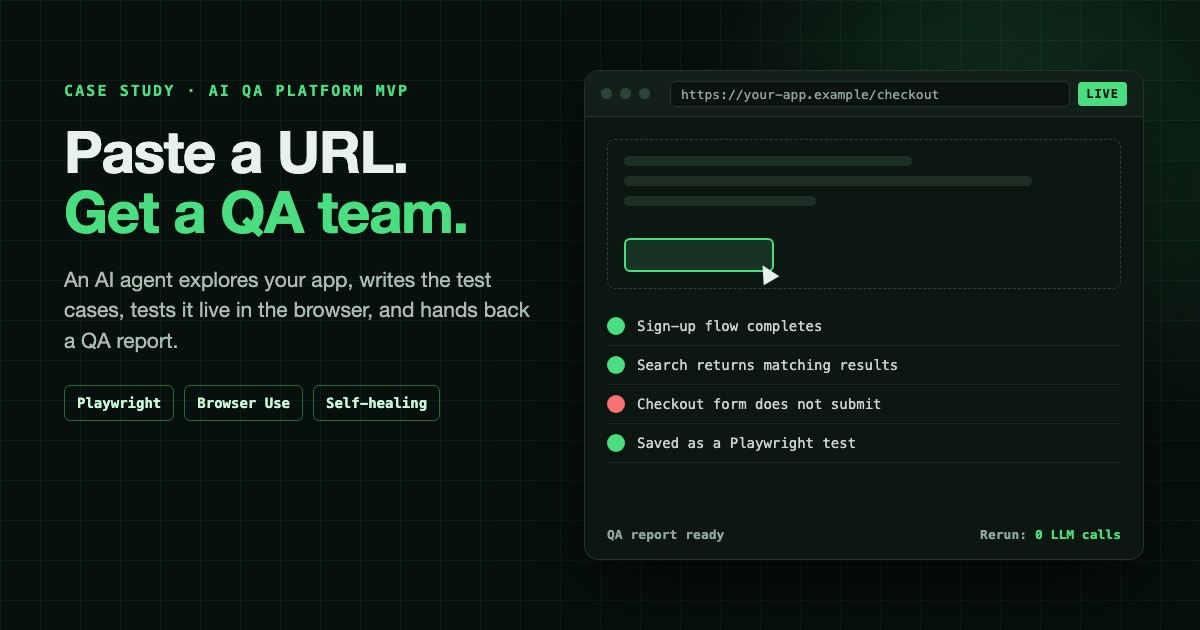
A founder came to us with a product idea that sounds simple when you say it out loud: a user pastes in their website or web app URL, and an AI QA team tests it for them. The AI explores the application like a business analyst, writes the test cases, executes them in a real browser like a QA engineer, and hands back a quality assurance report. The user can watch the whole thing happen live in their browser, and once a test run has been validated, it can be rerun as a plain Playwright test without calling a large language model at all.
We built the core engine of that platform, the Playwright and Browser Use AI integration that does the actual testing, for a fixed $5,000 over two months. The founder's own team built the rest of the product around it: user management and the other platform features. The client is under NDA, so they stay unnamed here, but the architecture, the product decisions and the trade-offs are all fair game, and they are the useful part.
The key numbers at a glance:
- What it was: a self-serve web platform. Paste a website or web app URL, an AI agent tests it live in the browser, and you get a QA report.
- Our part: the core engine, meaning the Browser Use agents, the Playwright integration, test generation, LLM-free replay and self-healing. The founder's team built user management and the rest of the platform.
- Engagement: two months as a part-time development partner, working inside the founder's Bitbucket, with everything handed over at the end.
- Build cost: a fixed $5,000 for the engine, paid in two milestones: 50% in advance, 50% on completion.
- Rerun cost: $0 in model fees once a test run is validated and saved as a Playwright script.
- The alternatives: running a 50-test suite through Claude Sonnet 5.5 every working day costs about $523 a month in model fees, and a QA engineer costs about $8,692 a month in salary alone at the US median.
This build sits directly on the engine we developed for an e-commerce client, described in our AI QA automation case study with Playwright: stability-scored selectors, self-healing when the UI changes, and AI on the exception path rather than the hot path. The difference is who the product is for. That earlier system was embedded in one engineering team's CI pipeline. This one had to be a self-serve product that a stranger could use with nothing but a URL.
Our Role: The Engine, Not the Whole Platform
It is worth being precise about who built what, because "we built an AI QA platform" would overstate it.
The founder already had a development team working on the product. What they did not have was the AI testing core: the part that takes a URL, explores the application, writes and executes test cases in a real browser, records them, and replays them without a model. That is the part we were brought in for.
| Part of the MVP | Built by |
|---|---|
| Browser Use agent layer: exploration, test case generation, execution | ValueStreamAI |
| Playwright integration: browser sessions, element recording, saved test scripts | ValueStreamAI |
| LLM-free replay and self-healing | ValueStreamAI |
| User management | The founder's team |
| The rest of the platform around the engine | The founder's team |
How the Engagement Worked
The founder invited us into their Bitbucket workspace, and we worked directly in their repository rather than building in our own and shipping a bundle over the wall. We joined as a part-time development partner alongside their team for two months, which kept the engine and the platform built against the same code from the first week rather than meeting for the first time at integration.
The commercial terms were deliberately simple: a fixed $5,000, split into two milestones, 50% in advance and 50% on completion. At the end we handed everything over. The code already lived in the founder's repository, so the handover was about making sure their team could run, extend and debug the engine without us.
That shape suits a founder with a capable team and one specialist gap. Their developers did not need to learn agent orchestration, Playwright recording and self-healing replay under deadline pressure. We did not need to build user management or anything else their team already knew how to do. Each side worked on what it was fastest at.
The founder invited ValueStreamAI into their Bitbucket repository. Over two months as a part-time development partner, ValueStreamAI built the core engine, the Browser Use agents, Playwright integration, LLM-free replay and self-healing, while the founder's team built user management and the rest of the platform in the same repository. Payment was 50% in advance and 50% on completion, and everything was handed over at the end.
What the Platform Was
The platform was a self-healing AI QA product: a web application where any user could submit the address of a website or web app and receive full end-to-end testing of it, without writing a single test.
It combined three roles that normally belong to three different people:
- The business analyst, who works out what the application is for, what its users are trying to do, and therefore what needs testing.
- The QA engineer, who turns that understanding into test cases and executes them, step by step, in a real browser.
- The automation engineer, who takes the tests that matter and turns them into repeatable scripts that run on every release.
In a traditional team, the handoffs between those three roles are where time disappears. The analyst writes requirements, the tester interprets them, and the automation engineer re-interprets the tester's steps into code. The platform collapsed that chain into one continuous pipeline, with an AI agent doing the first two jobs and Playwright doing the third.
Who It Was For
The target user was a team that ships a web product and has no dedicated QA function, or one so stretched that regression testing happens by hand the night before a release, if at all.
That covers a lot of people: early-stage founders whose developers test their own work, agencies delivering client sites with no budget line for QA, and small product teams where "testing" means someone clicking through the checkout before deploy. These users share two traits. They know their application should be tested more thoroughly than it is, and they do not have the time or the skills to write and maintain an automated test suite.
That second trait drove almost every product decision. A user who cannot write Playwright cannot be asked to fix a broken selector, configure a test runner, or read a stack trace. The platform had to take a URL and return something a non-engineer could act on.
The Experience, Start to Finish
The product was designed around a single input and a visible process. The user should never wonder what the AI is doing or why.
- 01Paste a URL
The user gives the platform the address of their website or web app. No scripts, no setup.
- 02The AI acts as business analyst
The agent explores the application, maps its pages and flows, and writes test cases in plain language.
- 03The AI acts as QA tester
The agent executes each test case in a real Playwright-driven browser, streamed live into the web app.
- 04The QA report
Every run ends in a quality assurance report: what was tested, what passed, what failed and what the agent saw.
- 05LLM-free reruns
Validated runs are saved as Playwright tests and replay deterministically, with no model cost.
Stage 1: Paste a URL
The user signs in and submits the address of the application they want tested. That is the whole setup. No SDK to install, no test framework to choose, no repository access.
Stage 2: The AI Acts as a Business Analyst
Before testing anything, the agent explores. It navigates the application, maps its pages and the flows between them, and works out what a real user would come here to do: sign up, search, add to cart, submit a form, update a profile.
From that map it generates test cases in plain language, the way an analyst would write acceptance criteria. This step is what separates the platform from a crawler that checks for broken links. A crawler knows the page loaded. The analyst step knows the page was supposed to let you complete a purchase, and tests whether you can.
Stage 3: The AI Acts as a QA Tester, and You Can Watch
The agent then executes each test case in a real browser session driven by Playwright, and that session is streamed live into the web app. The user watches the AI click, type, scroll, wait for content and move through their application in real time.
The live view was a core feature rather than a debugging extra, and the engine was built to support it, because people find it hard to trust a report from a process they cannot see. Watching an agent struggle with a confusing navigation menu tells a founder more about their UX than any pass/fail line ever will. It also turns a black box into something a user can sanity-check, which matters when the tester is a probabilistic model.
Stage 4: The QA Report
Every run ends in a quality assurance report: which test cases were executed, which passed, which failed, and what the agent observed at the point of failure. The report is written for the person who will act on it, so a failure reads as "the checkout form did not submit after a valid card was entered", not as a selector timeout.
Stage 5: Rerun Without the LLM
This is the feature the whole product's economics depend on. Once a recorded test run has been validated, it is saved as a Playwright test script. From then on the user can rerun it on demand, as often as they like, and the rerun does not call a large language model. It replays the recorded steps at browser speed, deterministically, at no model cost.
The user submits a URL. The AI agent explores the application as a business analyst and writes test cases, then executes them as a QA tester in a Playwright browser that the user watches live. Each run produces a QA report. Validated runs are saved as Playwright scripts, which the user can rerun on demand with no LLM calls.
How It Was Built: The Architecture
Our engine reused the core of our existing AI tester, adapted so a product could drive it. The founder's team built the platform around it.
- The web app, built by the founder's team, is where users sign in, submit URLs, watch live sessions, read reports and trigger reruns.
- The agent layer uses Browser-Use for agentic browser control and Google Gemini for reasoning about pages: deciding what to explore, what to test and how to read what it sees. This is the same reasoning layer behind the self-healing engine in our earlier QA build.
- The browser engine is Playwright, which runs every session, captures element metadata as the agent works, and executes the saved scripts on rerun.
- The test store holds validated runs as Playwright scripts, each step carrying several candidate selectors ranked by how likely they are to survive a UI change.
- The report generator turns each run into the QA report the user reads.
The design rule throughout was the one we apply to every agent system: the model is used where judgment is needed, and nowhere else. It is the same principle we set out in how to build AI agents, and it is what made a $5,000 price tag possible without the product being expensive to operate.
How Context Was Preserved Across the Agent
An agent that tests a real application has to remember things at four different scales: within a single step, across the steps of one test, across the stages of the pipeline, and across runs weeks apart. Each scale needed a different mechanism, and losing context at any of them shows up as the same symptom, an agent that repeats itself or forgets what it was testing.
Within a run, Browser Use carries a running memory. At every step the library asks the model to evaluate whether the previous action worked, write a short memory note, and state its next goal, so the agent's own summary of progress travels forward with the page state. The library's max_history_items setting caps how many past steps stay in the prompt, which is what stops a 40-step test from dragging its entire transcript into every model call.
Between stages, the handoff is a structured artefact, not a transcript. The business analyst stage produces a map of the application and a set of plain-language test cases. Each test execution starts from its own test case and the part of the map it needs, not from the full exploration history. That keeps every tester run focused and its prompt small, and it means a confused exploration does not contaminate every test that follows.
Across runs, the recorded element metadata is the long-term memory. When the agent interacts with an element, Playwright captures what that element meant: its accessibility label and role, its text, its computed styles and its place in the page hierarchy. That record outlives the session. It is what lets a replay find the element again weeks later, and what the model compares against when a selector breaks and the step has to heal.
For the user, the run record is the context. The live session, the steps taken and the outcome of each one feed the QA report, so the person reading it sees the same history the agent worked from.
Within a run, Browser Use carries a per-step memory note and a capped step history. Between stages, the business analyst output, an app map and plain-language test cases, is handed to each test execution instead of the full transcript. Across runs, the element metadata Playwright recorded is stored with the script and used for replay and self-healing. The run record feeds the QA report.
The Hard Problem: Agents Are Good Explorers and Bad Repeaters
The temptation with a product like this is to let the AI do everything on every run. It demos beautifully. It is also the wrong architecture, and the research says so plainly.
The WebArena benchmark, published by researchers at Carnegie Mellon and presented at ICLR 2024, tested autonomous agents on realistic tasks across working websites, including e-commerce stores and content management systems. When it launched, the best GPT-4-based agent completed 14.41% of tasks end to end. Humans completed 78.24%.
The models have moved a long way since. On the public WebArena leaderboard maintained by Steel.dev, the top entry as of October 2026 is WebTactix, running on DeepSeek v3.2, at 74.3%, within four points of the human baseline. That is real progress, and it is the reason products like this one are viable at all. It does not change the conclusion. An agent that succeeds 74% of the time on a fresh task still takes a different path through the same task on a different day, and it fails in ways that are hard to predict.
Browser Agent Benchmarks in 2026: Where the Models Stand
The most useful current numbers for this build come from the team behind the Browser Use library itself, because they test frontier models running inside the library rather than inside each vendor's own agent. Treat them as a vendor benchmark: Browser Use designed the tasks and sells a cloud product that appears in the results. Their judge, an LLM, agrees with human labels 87% of the time by their own measurement.
| Model, running on Browser Use | BU Bench V1 success (100 hard tasks) |
|---|---|
| Claude Fable 5 | 80.0% |
| Browser Use Cloud (bu-ultra) | 78.0% |
| Claude Opus 4.6 | 62.0% |
| Gemini 3.1 Pro | 59.3% |
| Claude Sonnet 4.6 | 59.0% |
| GPT-5 | 52.4% |
| GPT-5 mini | 37.0% |
| Gemini 2.5 Flash | 35.2% |
Source: Browser Use, "Browser Agent Benchmark", published January 2026, updated 11 June 2026.
Two things in that table matter for a QA product. First, even the best model fails one hard task in five. Run a 50-test regression suite through an 80%-reliable agent and you should expect around ten failures per run that have nothing to do with your code. Second, the cheap, fast model sits at the bottom. Gemini 2.5 Flash, the class of model that makes per-run economics work, completes barely a third of hard autonomous tasks. A product that depends on the cheap model doing everything unsupervised is building on its weakest number.
That is why the platform never asks the agent to be reliable on its own. It asks the agent to explore and draft, puts a human validation step in front of anything permanent, and hands repetition to Playwright.
That is fine for exploration, where variety is useful and a human reviews the output. It is unacceptable for regression testing, where the entire point is that the same test does the same thing every time. A test that passes on Monday and fails on Tuesday with no code change is not a test. It is noise.
This is a direct application of something we have learned across every agent deployment: LLMs are non-deterministic, and setting temperature to zero does not change that. Production systems need a deterministic path for anything that must be repeatable, with the model reserved for the steps that genuinely need reasoning.
So the platform splits the work:
| Phase | Who does it | Why |
|---|---|---|
| Explore the application | AI agent | Needs judgment about what the app is for |
| Write test cases | AI agent | Needs to infer user intent from the interface |
| First execution | AI agent in Playwright, watched live | Needs to adapt to an unfamiliar UI |
| Validation | Confirmed before saving | Stops a wrong run becoming a permanent test |
| Every rerun after that | Playwright script, no LLM | Must be fast, cheap and identical every time |
| A selector breaks after a UI change | Model, for that one step only | Self-healing, then back to deterministic replay |
Why Reruns Cost Nothing in Model Fees
The rerun feature is not a cost optimisation bolted on at the end. It is the business model.
Agent replays every step through the LLM. Every rerun is billed.
The same prompt can take a different path on a different day.
Each step waits on a model response.
The agent improvises, sometimes correctly.
If every rerun went through the agent, the platform's cost of goods would scale with every test a customer ran, and customers who tested most diligently would be the least profitable. Worse, the vendor would be incentivised to discourage the exact behaviour the product exists to encourage.
By recording the agent's validated run as a Playwright script, the expensive reasoning is paid for once, at discovery. Every subsequent run is ordinary browser automation: no tokens, no model latency, no variance. A user can rerun their suite before every deploy without the platform's costs moving.
Self-Healing Keeps the Scripts Alive
Recorded scripts have a well-known weakness: they break when the UI changes. A developer renames a CSS class and the script can no longer find its button. In a traditional suite, a human repairs it by hand, and that maintenance is why so many teams abandon their automation.
The platform inherits the self-healing engine from our earlier build. Every recorded step stores several candidate selectors, scored by stability: accessibility labels and roles first, deliberate data-test-id attributes next, and volatile CSS classes only as a last resort. On rerun, the script uses the most stable selector. Only when that fails does the model get called, and only for the broken step, to visually match the recorded element on the changed page and update the script. Then replay goes back to being deterministic.
A rerun replays each step of a validated Playwright script using its most stable selector. If the element is found, the step passes with no model involved. If the selector has broken after a UI change, the model is called for that step only, matches the recorded element and updates the script, and replay continues deterministically. The run ends in a QA report.
Against 78.24% for humans when WebArena launched. The best 2026 agent reaches 74.3%, close to human, but close to human still means some runs fail, so the platform uses agents to discover tests, not to rerun them.
Even deterministic scripts flake. Google measured about 1.5% of all test runs as flaky, which is why the platform scores selectors for stability and heals the broken ones.
That stability scoring matters more than it looks. Google's own testing team reported that about 1.5% of all test runs, and almost 16% of individual tests, showed some flakiness, in a test infrastructure run by one of the most sophisticated engineering organisations in the world. Flakiness is not a beginner's problem. A self-serve product whose users cannot debug a test has to prevent it by design rather than leave it for the user to discover.
Human in the Loop: Where People Stay in Control
The platform is automated, but it is not autonomous, and that distinction is deliberate. A probabilistic tester needs human checkpoints at exactly the moments where a mistake would become permanent or expensive. The platform has four.
- Reviewing the test cases. The business analyst stage infers intended behaviour from the interface, and it can infer wrong. A user who knows their discount field is meant to reject expired codes reads a "failure" there very differently from an agent that expected acceptance. The test cases are written in plain language precisely so the person who owns the product can read and correct them.
- Watching the run. The live view lets the user see what the agent is doing as it does it. A run that wanders off into the wrong part of the app is obvious to a human in seconds and invisible in a pass/fail count.
- Validating before saving. No agent run becomes a permanent Playwright script until it has been validated. This is the most important gate in the product, because a wrong run saved as a test gets replayed faithfully, forever, at zero cost. It is the same principle as testing agents in a sandbox before they touch anything real: the model's output is checked before it is allowed to have lasting consequences.
- Triaging the report. The report tells a human what failed and what the agent saw. Deciding whether that failure is a bug, a changed requirement or a test that needs updating stays a human decision.
The pattern matters beyond QA. Human-in-the-loop is not a sign that the AI is weak. It is how you get the benefit of a fast, cheap, imperfect model without inheriting its failure rate.
The AI writes plain-language test cases, which the user reviews and corrects. The AI runs each test while the user watches live. A run must be validated before it is saved as a Playwright script. Every run produces a report, and the user decides whether each failure is a bug, a changed requirement or a test to update.
Edge Cases the Platform Was Built to Handle
Most of the engineering in a browser testing product goes into the cases a demo never shows. The platform inherited the hardening from our earlier e-commerce QA build and relied on the guardrails Browser Use provides for the agent itself.
| Edge case | How the platform handled it |
|---|---|
| Content that loads asynchronously | Playwright's built-in waiting plus a check that the page's state matches the expected outcome, instead of fixed timers |
| UI changes between runs | Stability-scored selectors, with the model called to heal only the step that broke |
| Pages that work but look wrong | Visual checks against recorded styles and layout catch layout shifts, overlapping elements, broken responsive breakpoints and modals that fail to dismiss |
| Bot protection on live sites | Playwright-Stealth and user-agent rotation, so the agent sees the site a real visitor sees |
| An agent that gets stuck | Browser Use's retry limit (max_failures, five by default) stops a looping agent, and the run is reported as a failure rather than left running |
| Flaky timing | Deterministic replay removes model variance, and stability scoring avoids the brittle selectors that cause most false alarms |
There are also edges this approach does not handle well, and any honest buyer should hear them up front. CAPTCHAs are designed to stop exactly this kind of automation. Two-factor authentication and real payment flows need test accounts and sandbox credentials from the application owner. Native mobile apps need a different toolchain from a browser-based tester. None of these are unsolvable, but each one is engineering work, not a setting.
Fast Automations: Where the Speed Comes From
Speed comes from the same split as cost: the model is slow, the browser is fast, so the platform keeps the model out of the path wherever it can.
Agent runs are measured in minutes. Browser Use reports its own optimised agent averaging 68 seconds per task, about 3 seconds per step, on the Online-Mind2Web benchmark, against 225 to 330 seconds for the computer-use agents it compared (October 2025 figures). On its harder BU Bench V1 tasks, Claude Fable 5 averaged 6 minutes 53 seconds per task. Model choice moves agent speed by a factor of several.
Replays run at browser speed. A validated Playwright script waits on the application, never on a model, so a rerun takes as long as the pages take to load and respond. And because Playwright's test runner executes tests in parallel workers, a suite scales across processes rather than queueing behind a single agent.
The agent is tuned not to waste calls. Browser Use lets one model call issue several actions at once (max_actions_per_step, five by default), so a form with four fields is filled in one round trip rather than four, and it offers a flash_mode that skips the model's reasoning fields for simpler steps.
Token Consumption: What One Agent Run Actually Costs
To understand why replay matters, it helps to see where the tokens go in a single agent-driven test. Every step, the model is sent the task, its memory and recent history, a structured list of the page's interactive elements, and, with vision on, a screenshot. Independent measurement puts a single screenshot at roughly 1,500 to 2,000 tokens on its own. The model replies with a short evaluation, a memory note and its next actions, typically a few hundred tokens.
Our worked estimate for a typical test case is 25 steps at about 8,000 input and 300 output tokens per step, so 200,000 input and 7,500 output tokens per run. That is an estimate, not a measurement from the client's platform, and long or visually heavy pages push it higher. Priced at each provider's published standard rates in October 2026:
| Model | Input / output price per 1M tokens | Cost of one 25-step run |
|---|---|---|
| Gemini 2.5 Flash | $0.30 / $2.50 | $0.08 |
| GPT-5.4 mini | $0.75 / $4.50 | $0.18 |
| Claude Sonnet 5.5 | $2 / $10 | $0.48 |
| Claude Opus 5.5 | $4 / $20 | $0.95 |
| GPT-5.5 | $5 / $30 | $1.23 |
| Claude Fable 5.1 | $10 / $50 | $2.38 |
Those figures are a floor rather than a ceiling. On its hardest internal benchmark (106 tasks, updated August 2026), Browser Use measured $3.40 per task for Opus 5, $1.55 for Sonnet 5 and $1.10 for GPT-5.6, because hard tasks take far more steps than a typical test case. Its full 100-task BU Bench V1 run on Claude Fable 5 cost $580.87 in API spend. Prompt caching narrows the gap on the repeated parts of the prompt: Claude Sonnet 5.5 charges $0.20 per million cached input tokens against $2 uncached, and OpenAI and Google offer similar discounts.
None of these per-run numbers look alarming on their own. The problem is multiplication.
The Cost Comparison: QA Engineer vs Agent on Every Run vs This Platform
Take a modest regression suite of 50 test cases, run every working day: 1,100 runs a month.
| Approach | What it costs | What it does not include |
|---|---|---|
| A QA automation engineer | About $8,692 a month, from the BLS median wage of $104,300 for software QA analysts and testers (May 2025) | Benefits, payroll taxes, equipment and recruiting |
| AI agent on every run, Gemini 2.5 Flash | About $87 a month in model fees | Lowest reliability of the models above on hard tasks |
| AI agent on every run, Claude Sonnet 5.5 | About $523 a month in model fees | Run-to-run variance on every test |
| AI agent on every run, Claude Fable 5.1 | About $2,613 a month in model fees | Run-to-run variance on every test |
| This platform: discover once, replay forever | Discovery of 50 tests is about $4 on Flash or $24 on Sonnet 5.5, once. Reruns cost nothing in model fees. A heal is one step, about 1/25th of a run | The $5,000 one-off engine build |
Hosting and browser infrastructure apply to every automated option and are left out of all the figures above.
Two honest caveats. A QA engineer does far more than run a regression suite: test strategy, exploratory testing, judging what matters to the business. The platform does not replace a senior QA lead, and was never meant to. It replaces the absence of one, which is the real situation for most of its target users. And the agent-on-every-run figures grow linearly with test count and run frequency, while the replay model's cost barely moves, which is the whole argument for the architecture.
Advantages and Disadvantages of This Approach
| Advantages | Disadvantages |
|---|---|
| A non-technical user gets test coverage from a URL alone | The AI infers intended behaviour and can infer wrong, so test cases need human review |
| Model costs are paid once per test, not once per run | Discovery is only as good as the agent's exploration of the app |
| Reruns are deterministic, fast and free of model variance | CAPTCHAs, two-factor login and real payments need setup from the app owner |
| Self-healing keeps scripts alive through routine UI changes | A large redesign can still break more steps than healing can recover |
| Output is standard Playwright, so the tests are not locked in | Visual and semantic checks catch more than selectors, but not every business-logic bug |
| The live view makes a probabilistic tester auditable | It does not replace the judgment of an experienced QA lead |
What We Learned Building It
A handful of decisions shaped the build more than any others.
An agent's first run is a draft. Treating it as a finished test was the easiest mistake to make, and the validation gate exists because of it.
The live view is a trust feature, not a nice-to-have. A failure you watched happen is easy to accept as real. A failure that only appears as a line in a report invites the question of whether the AI got it wrong. When the tester is probabilistic, showing the work is part of the product.
The analyst step is where the value is. Plenty of tools can replay a recorded click path. Very few can look at an unfamiliar application and decide what is worth testing. That inference, from interface to intent, is the part a non-technical user cannot do for themselves, and it is the part that justifies an AI in the loop at all.
Write reports for the reader, not the engineer. The people buying this product do not read stack traces. A report that says a selector timed out is useless to them. A report that says the signup form rejected a valid email address gets fixed the same day.
Agreeing what "correct" means comes first. Reviewing test cases before trusting their results is the product's version of the stakeholder alignment we push for on every AI build before it goes live.
What an MVP Like This Costs
The client paid $5,000 for the core engine, in two milestones: 50% in advance and 50% on completion, across a two-month part-time engagement. That bought the full AI pipeline from URL to test cases to live execution to LLM-free rerun. User management and the rest of the platform were built, and paid for, separately by the founder's own team.
That figure deserves context, because it is low for what the engine does, and it is honest to say why. We were not starting from zero. The recorder, the stability scoring and the self-healing replay already existed and had run in production for another client. The budget went on adapting that engine into something a product could drive: the URL-to-test-case analyst step, execution in sessions the platform could stream, the run data behind the reports, and the rerun flow. A team building the engine from scratch would be looking at a materially larger build.
It is also an MVP in the literal sense. It proves the product works and gives the founder something to put in front of users and investors. It is not a hardened, multi-tenant SaaS platform with billing, scheduling, CI integrations and the operational monitoring a production product needs. Those come after the MVP has shown people want it, which is exactly the order they should come in.
For a sense of where builds like this sit, our pricing page publishes the bands we work in, and the automation quote tool gives a scoped estimate for your own idea before you speak to us. If you are weighing an agency against hiring, we lay out the numbers in the real cost of AI agents.
How to Tell a Real AI QA Product From a Demo
If you are evaluating an AI testing tool, or a vendor offering to build one, the hard questions are the same ones that shaped this build:
- Does the AI run on every test, or only on discovery and repair? If it runs on every test, your costs scale with your diligence and your results vary between runs.
- Can you export the tests? If the output is a proprietary format, you are renting your test suite. The platform here produced standard Playwright scripts.
- What happens when the UI changes? "The AI figures it out" is not an answer. Ask whether it heals the specific step and returns to deterministic replay, or improvises the whole run again.
- Can you watch it work? A tester you cannot observe is a tester you cannot audit.
- What stops a wrong run becoming a permanent test? If nothing validates a run before it is saved, the suite will encode the agent's mistakes.
We go deeper on separating real engineering from impressive demos in how to choose an AI agent development company.
Where This Fits in Our Work
This project is a good example of the kind of work we take on through our AI app development service: a founder with a clear product idea and a capable team, missing one specialist piece, the AI-native core. We joined as a development partner inside their repository, built that piece, and handed it over, without the architecture painting them into a corner later. The product decision that mattered most, using the model to discover tests and Playwright to repeat them, is also the one that would have been hardest to change after launch.
If your need is the testing itself rather than a product to sell, the AI QA automation case study shows the same engine embedded inside a client's own engineering team and CI pipeline.
Frequently Asked Questions
What did the AI QA platform actually do? A user submitted the URL of a website or web app. An AI agent explored the application like a business analyst, wrote test cases in plain language, executed them in a real Playwright-driven browser the user could watch live, and produced a quality assurance report. Validated runs were saved as Playwright scripts that could be rerun without calling an LLM.
How could users watch the AI test their application? The Playwright browser session the agent was driving was streamed into the platform's web app in real time. Users could see every click, keystroke and page change as the agent tested their application, which made the resulting report far easier to trust.
Why do reruns not need a large language model? Once a test run was validated, it was saved as a standard Playwright script with stability-scored selectors for every step. Rerunning it is ordinary browser automation, so it costs nothing in model fees and behaves identically every time. The model is only called again if a selector breaks after a UI change, and only for that one step.
What does self-healing mean in an AI testing platform? Each recorded step stores several candidate selectors ranked by how likely they are to survive a UI change. If the preferred selector fails after a redesign, the model visually matches the recorded element on the new page and updates the script, so the test keeps running instead of breaking and waiting for a human to repair it.
What did ValueStreamAI build, and what did the founder's team build? We built the core engine: the Browser Use agent layer that explores apps and writes and executes test cases, the Playwright integration that records and replays them, and the LLM-free replay with self-healing. The founder's own team built user management and the rest of the platform. We worked inside their Bitbucket repository as a part-time development partner for two months and handed everything over at the end.
How much did the AI QA platform MVP cost? The client paid a fixed $5,000 for the core AI engine, in two milestones of 50% in advance and 50% on completion, over a two-month part-time engagement. The price reflected the fact that the self-healing replay engine already existed from an earlier client engagement. User management and the rest of the platform were built separately by the founder's own team.
Why not let the AI agent run every test every time? Because even the best agents fail some runs, and every run costs money. On Browser Use's 2026 benchmark the top model, Claude Fable 5, completed 80% of hard tasks, so a 50-test suite could see around ten spurious failures per run. Running every test through Claude Sonnet 5.5 daily would also cost about $523 a month in model fees, against nothing for validated Playwright replays.
How many tokens does an AI browser agent use per test? Our working estimate for a typical 25-step test case is about 200,000 input and 7,500 output tokens, because each step sends the page's interactive elements, recent history and often a screenshot of 1,500 to 2,000 tokens. That costs roughly $0.08 on Gemini 2.5 Flash, $0.48 on Claude Sonnet 5.5 and $2.38 on Claude Fable 5.1 at October 2026 list prices.
Is an AI QA platform cheaper than hiring a QA automation engineer? For running a regression suite, by a wide margin: the BLS median wage for software QA analysts and testers was $104,300 in May 2025, about $8,692 a month before benefits, against a $5,000 one-off engine build and near-zero model cost for replays. It is not a like-for-like swap, because an engineer also owns test strategy and exploratory testing.
How did the agent keep context across a long test? Browser Use writes a memory note and next goal at every step and caps how much step history stays in the prompt. Between pipeline stages, each test run received its own test case and the relevant part of the app map rather than the whole exploration transcript, and across runs the recorded element metadata served as long-term memory for replay and self-healing.
Can a non-technical founder use a platform like this? Yes, that was the target user. The only input is a URL, the test cases are written in plain language, the live view shows exactly what the AI is doing, and the report describes failures in terms of what a user could not do rather than in technical errors.
Have a Product Idea With an AI Core?
If you are a founder with an AI-native product in mind, the fastest route to finding out whether it works is a scoped MVP built on architecture that will survive contact with real users. A discovery call is 30 minutes: what the MVP needs to prove, which parts the model should and should not do, what it will cost to run once people use it, and a fixed price for the build.