The hardest part of getting employees to use AI is not the software. It is that your staff are already using it, quietly, on personal accounts, without rules, and some of them are worried about what it means for their jobs. An owner who announces "we are rolling out AI" walks into both problems at once. An owner who explains what AI is for, sets a few simple rules, and lets the team shape the first project gets adoption that sticks.
This guide is for owners and managing directors of established businesses who want their people to use AI well without scaring them, wasting a training budget, or leaking company data. It covers how to introduce AI, how to train in a way that changes behaviour, the legal training duty that now applies in the EU, and how to tell whether any of it is working.
| Metric | 2026 Benchmark |
|---|---|
| AI users bringing their own tools to work | 78%; 80% at SMBs (Microsoft Work Trend Index 2024) |
| Productivity gain for newer staff with AI help | 34% (NBER w31161) |
| EU AI literacy duty in force since | 2 February 2025 (AI Act, Article 4) |
| Supervision of that duty begins | 2 August 2026 |
| US admin labour cost (BLS, May 2025) | $22.86/hour, $47,540/year base pay |
Why Employee AI Adoption Is Different in a Small Business
In a large company, AI adoption is a programme with a budget, an internal team and a training department. In a business of 20 to 100 people, it is usually the owner, an operations manager and whoever on the team is most curious. That is not a weakness. Small teams can move faster, talk directly, and see results within weeks. But it means the approach has to be personal, practical and cheap.
It also means the stakes of getting the message wrong are higher. In a 40-person company, everyone knows everyone. If one person hears "AI" and thinks "redundancy," the whole office hears it by lunchtime.
The figure that changes the conversation comes from Microsoft and LinkedIn's 2024 Work Trend Index, a survey of 31,000 knowledge workers across 31 countries: 78% of AI users bring their own AI tools to work, and the figure rises to 80% at small and medium-sized companies. Note that the denominator is AI users, not all workers. But the implication is clear. In most businesses, the question is not whether staff will use AI. It is whether they will use it with your guidance or without it.
How to Introduce AI Without Scaring Employees
Most resistance to AI is not technophobia. It is a reasonable fear of losing a job or being made to look slow. Address that directly, in person, before anything else.
Say what AI is for, and what it is not for. Be specific: "We want to remove the copying, chasing and re-typing from your day so you can spend more time on customers." If you have decided not to reduce headcount because of AI, say so plainly. If you have not decided, do not promise it. People can tell.
Name what will not change. Who makes decisions, who talks to key clients, who approves anything that leaves the building. Saying that a person stays in charge of the important things is more reassuring than any amount of enthusiasm about the technology.
Ask before you automate. The people doing a task know where the time goes and what goes wrong. Ask them to log their repetitive work for two weeks (our automation audit shows how), and involve them in choosing the first project. People resist things done to them and support things they helped build.
Be honest about the evidence. The best study on AI and workers, covering 5,179 customer support agents (NBER working paper w31161), found that AI assistance raised productivity by 14% on average and 34% for newer, less experienced staff, with little change for the most experienced. AI made new people good faster. It did not make experienced people redundant. That is a message your team can believe because it is true. We cover the wider data, including where displacement is real, in will AI replace my employees.
Set Simple Rules Before Anyone Is Trained
Training people to use AI before you have told them which tools are allowed and what data must never go in is how businesses end up with client data in personal chat histories. The rules can fit on one page:
- Approved tools. Which AI tools staff may use for work, and on which account types. Business-tier accounts matter: OpenAI states that ChatGPT Business, Enterprise and API data is not used to train its models by default, whereas personal accounts train on conversations unless the user switches it off.
- Data that must never be pasted. Customer personal data, financial details, health information, passwords, anything under an NDA.
- What needs a human check. Anything sent to a customer, anything involving money, anything that will be relied on as fact.
- Who to ask. One named person who answers questions and approves new tools.
We give you a ready-to-adapt version in our AI policy template for small businesses, and explain the data side in depth in how to protect your business data when using AI.
How to Train Employees to Use AI So It Actually Changes Behaviour
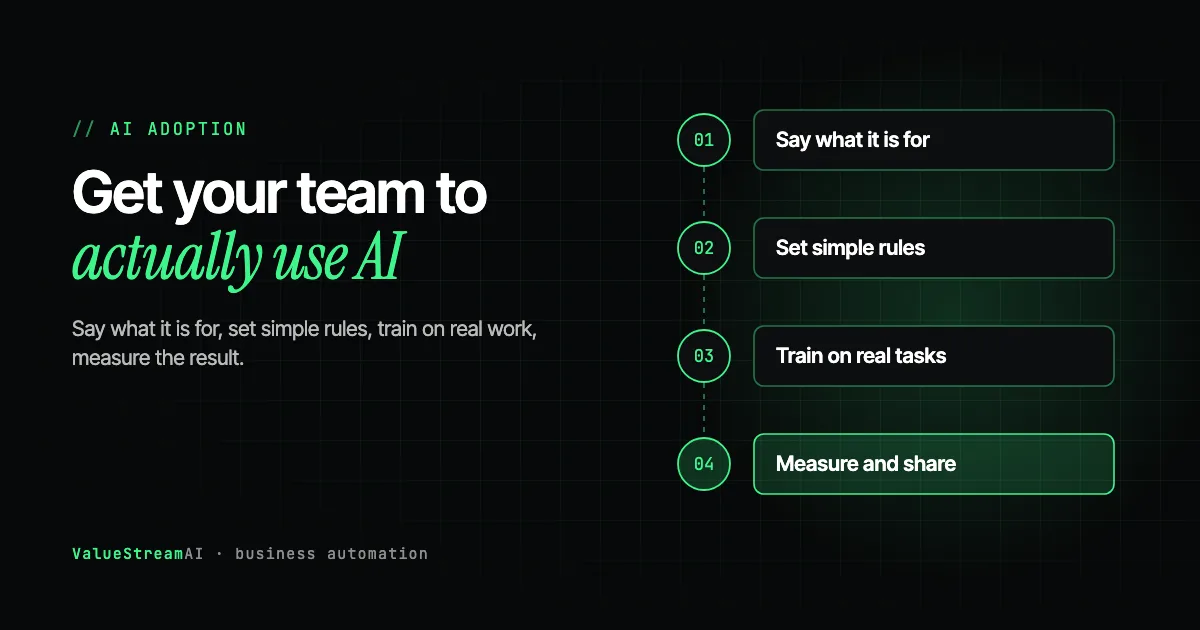
Most AI training fails for one of two reasons: it is too generic ("here is what ChatGPT can do"), or it is too long to remember. Training that works in small businesses has four features.
- 01Say what it is for
Tell the team in person: remove tedious work, not people. Say what will not change.
- 02Set simple rules
Approved tools, data that must never be pasted, who to ask.
- 03Find champions
One or two curious people per team, given time to experiment.
- 04Train on real tasks
Short sessions using each team's own work, not generic demos.
- 05Automate one workflow
Staff help design it and approve its outputs.
- 06Measure and share
Report hours saved and problems found, openly.
It uses each team's real work. The accounts team practises on a real (anonymised) supplier email. Sales practises on a real enquiry. Operations practises on the actual Monday report. People adopt a tool when they have seen it do their own job, not a demo job.
It is short and repeated. One 90-minute session followed by short follow-ups beats a full-day workshop. A widely shared observation from trainers is that very long sessions lose attention while very short ones produce no lasting change; frequent, practical sessions sit between the two.
It starts with a baseline. A quick, low-pressure conversation about how comfortable each person is with AI tells you who needs basics and who is ready to help others. Sending everyone to the same workshop wastes the budget on both groups.
It teaches checking, not just prompting. The single most important skill is knowing when an AI answer is wrong. Language models can produce confident, well-written output that is factually wrong. Train people to verify anything that matters and to notice when an answer sounds too sure.
Use internal champions, not just outside trainers
The most effective adoption tactic we see, in businesses of every size, is peer teaching. Bloomberg reported in November 2025 that when employee AI adoption stalled at ServiceNow, the company identified roughly 1,000 enthusiastic users and gave them recognition in return for teaching colleagues. A 40-person business does not need a thousand champions. It needs one or two curious people per team, given an hour a week to experiment and a standing invitation to show colleagues what worked.
Champions also solve the confidence problem. People who would never ask a trainer a "stupid question" will ask the colleague at the next desk.
Chat tools are the easy part. Do not stop there.
Training people to use Copilot, Gemini, ChatGPT or Claude well is worth doing, and it is mostly a solved problem: the vendors ship tutorials, prompt libraries and in-app guidance. A business that stops there gets individuals who write and summarise faster, and almost nothing that shows up in the numbers, because the time saved disappears into each person's day.
The adoption that changes a business is staff using AI that runs without them asking: the invoice check that happens on arrival, the enquiry routed before anyone opens the inbox, the report built overnight from three systems. Built-in assistants are designed around one person prompting and checking. So the most valuable thing training can do is teach people to spot the work a chat window cannot reach, which is exactly the list your team produces in a two-week automation audit. Make "what would you hand to a system that runs on its own?" a standing question in every session.
The EU AI Literacy Duty: What It Means for Your Business
If your business operates in the European Union, training is no longer only a good idea. Article 4 of the EU AI Act, in force since 2 February 2025, requires organisations that deploy AI systems to take measures to ensure a sufficient level of AI literacy among staff and others who operate those systems on their behalf. Law firms advising on the Act note that it applies regardless of the risk level of the AI involved, and that staff using tools like ChatGPT or Copilot at work are enough to make an organisation a deployer.
Three points worth knowing, stated carefully because the guidance is still settling:
- Supervision and enforcement of the literacy rules begin on 2 August 2026, according to legal commentary on the European Commission's guidance.
- The Act does not set a specific fine for Article 4 itself, but commentators warn that failing to train staff could count against a business if an AI-related harm occurs.
- Reports of later amendments exist through the EU's 2026 simplification package. Check the current text on EUR-Lex or with a lawyer before relying on the exact wording.
UK businesses are not directly bound by the EU AI Act, but those that serve EU customers through AI systems should check whether it reaches them. Either way, documented training is good practice and a sensible defence if something goes wrong. The practical response is the same: keep a simple record of who was trained, on what, and when.
Make the First Automation a Team Project
Training individuals to use chat tools is useful, but it is not where most of the value sits. The larger gains come from automating whole workflows, and those projects are where employee involvement matters most.
Staff log their repetitive work, then help choose the first workflow. During the pilot, staff approve every output the automation produces. Their feedback improves the system, and once it is reliable they move to reviewing only exceptions, with the time saved going back to customer work.
The people who did the task by hand become the people who approve its outputs during the pilot, and then the people who handle its exceptions. They know what a wrong answer looks like better than anyone. In our experience, the first hundred real cases always surface problems that internal testing missed, and it is the staff doing the work who spot them.
This is also the best answer to the job security question. The person who used to spend three hours a day typing invoices becomes the person who manages the invoice automation and handles the tricky cases. That is a more skilled job, not a lost one. Our LinkedIn applicants HR case study shows the pattern: the pipeline sorted around 6,000 applicants, and the HR team made every hiring decision.
How to Measure Whether Employees Are Actually Using AI Well
Usage alone is a poor measure. People can use AI constantly and get slower. A randomised trial by METR in July 2025 found that experienced open-source developers took 19% longer on real tasks with AI tools, while believing they had been 20% faster. It was a small study of a specialist group using early-2025 tools, and other studies have found speed-ups in other settings. The lesson for any business is narrow but important: perception is not evidence.
Support agents using an AI assistant. The average gain was 14%; the most experienced gained very little.
Experienced developers on their own code with early-2025 tools. They believed they were 20% faster. Measure, do not assume.
Measure three things, simply:
| Measure | How to get it | What good looks like |
|---|---|---|
| Time on the target task | Compare the audit log with a log after rollout | A clear drop on specific tasks |
| Quality | Error counts, rework, customer complaints | Flat or better, not worse |
| Staff view | A three-question monthly check-in | People say it removes tedium, not adds stress |
Share the results openly, including what did not work. Teams trust a rollout that admits its failures.
Human Hours vs Automation: The Cost of Training
Training has a cost in hours, and it should be priced like any other investment. These are assumptions, not measurements from a client.
The assumptions. A 40-person team each spends 4 hours in training and practice in the first month. The rate is $22.86 an hour (BLS, May 2025, administrative assistants, base pay; many staff will earn more). After training, each person saves light 0.5, typical 1, or heavy 2 hours a week on routine writing, summarising and lookups, over 48 working weeks (our assumptions; measure your own).
| Scenario | Training hours | Training cost | Hours returned per year | Value of hours returned |
|---|---|---|---|---|
| Light: 0.5 hr/week each | 160 | ~$3,660 | 960 | ~$21,900 |
| Typical: 1 hr/week each | 160 | ~$3,660 | 1,920 | ~$43,900 |
| Heavy: 2 hrs/week each | 160 | ~$3,660 | 3,840 | ~$87,800 |
The other side of the ledger. Business-tier AI subscriptions are a per-seat monthly cost, and an outside trainer or consultant adds to the training figure. Time saved by individuals with chat tools is also harder to capture than time saved by an automated workflow, because it gets absorbed into the day. That is why we recommend pairing individual training with one measured workflow automation.
What the numbers leave out. Fewer data leaks from unsanctioned tools, staff retention, and a team that suggests the next automation rather than resisting it. Run your own figures in the ROI calculator.
Common Mistakes When Rolling Out AI to Employees
- Banning AI outright. It pushes usage onto personal phones and accounts, where you have no visibility. Offer an approved tool instead.
- Buying seats and calling it adoption. A subscription gives people a capable assistant that knows nothing about your business. Without connecting it to your own documents and systems, most answers about your operations will be generic.
- Training once and stopping. Tools change every few months. Short, regular refreshers keep pace.
- Measuring logins. Measure time on tasks and quality instead.
- Letting the loudest enthusiast set the rules. Champions spread adoption; the owner and a named person set the guardrails.
When to Bring in Outside Help
Most small businesses can run the first steps themselves. Outside help makes sense when you want a workflow automation rather than just chat tools, when your data is sensitive enough that you want private AI on your own infrastructure (our free AI models directory lists the open options), or when you need training documented against the EU duty. Our AI consulting service covers readiness, rules and training, and our AI automation development service covers the first build. The free AI readiness assessment is a good place to start.
Free resources for training. Give your champions something real to practise on: our free automation templates and AI agent templates are verified, importable examples, and the free tools hub collects the calculators for measuring what the rollout saves. When you are ready for a first workflow, the automation quote tool gives a scoped estimate.
The Competitor Pulse Check
| Factor | ValueStreamAI Approach | Typical AI Training Offer |
|---|---|---|
| First step | Rules and a clear message on jobs | A workshop |
| Content | Each team's own real tasks | Generic prompt tips |
| Champions | Built into the rollout | Not mentioned |
| Workflow automation | Staff help design and approve it | Out of scope |
| Measurement | Time on task and quality | Attendance and logins |
| EU AI literacy record | Simple training log kept | Certificate of attendance |
| Overlap with Copilot, ChatGPT or Gemini | Builds only what built-in assistants cannot: unattended, cross-system, checked, private | Often rebuilds drafting and summarising you already pay for |
Frequently Asked Questions
How do I get my employees to use AI?
Get employees to use AI by explaining in person what it is for and what will not change, setting simple rules on approved tools and data, training each team on its own real tasks, and letting one or two internal champions show colleagues what works. Involve staff in choosing and approving the first automation.
How do I introduce AI without scaring employees?
Introduce AI by saying plainly that the goal is to remove tedious work, naming what stays with people such as decisions and client relationships, and asking staff where their time goes before automating anything. Only promise no job losses if you have actually decided that.
How should I train employees to use AI?
Train employees in short, repeated sessions using their own real work rather than generic demos, starting from a quick check of each person's comfort level. Teach them to verify AI output as much as to write prompts, and keep a simple record of who was trained and when.
Is AI training a legal requirement?
In the European Union, Article 4 of the AI Act has required organisations that deploy AI to ensure sufficient AI literacy among staff since 2 February 2025, with supervision starting 2 August 2026. UK businesses are not directly bound but should check if they serve EU customers through AI. Documented training is good practice everywhere.
Should I ban employees from using ChatGPT?
Banning ChatGPT usually pushes usage onto personal accounts and phones where you cannot see it. A better approach is to approve a business-tier account, where OpenAI states data is not used for training by default, and set clear rules on what data must never be pasted.
How do I know if employees are using AI effectively?
Measure time spent on specific tasks before and after, error and rework rates, and how staff feel about the change. Do not rely on how fast people feel: a 2025 trial found experienced developers were 19% slower with AI tools while believing they were 20% faster.
What's Next
Talk to your team this week, before you buy anything. Explain what AI is for, ask where their time goes, and ask who wants to be the first to experiment.
→ Read the complete AI for small business guide.
→ Set the rules with our AI policy template.
→ Or talk to us about a first automation your team helps design.
Muhammad Kashif is co-founder of ValueStreamAI, leading technical delivery and AI strategy. He designs and ships custom agentic AI and healthcare automation systems for clients across the US and UK. More about Muhammad Kashif →