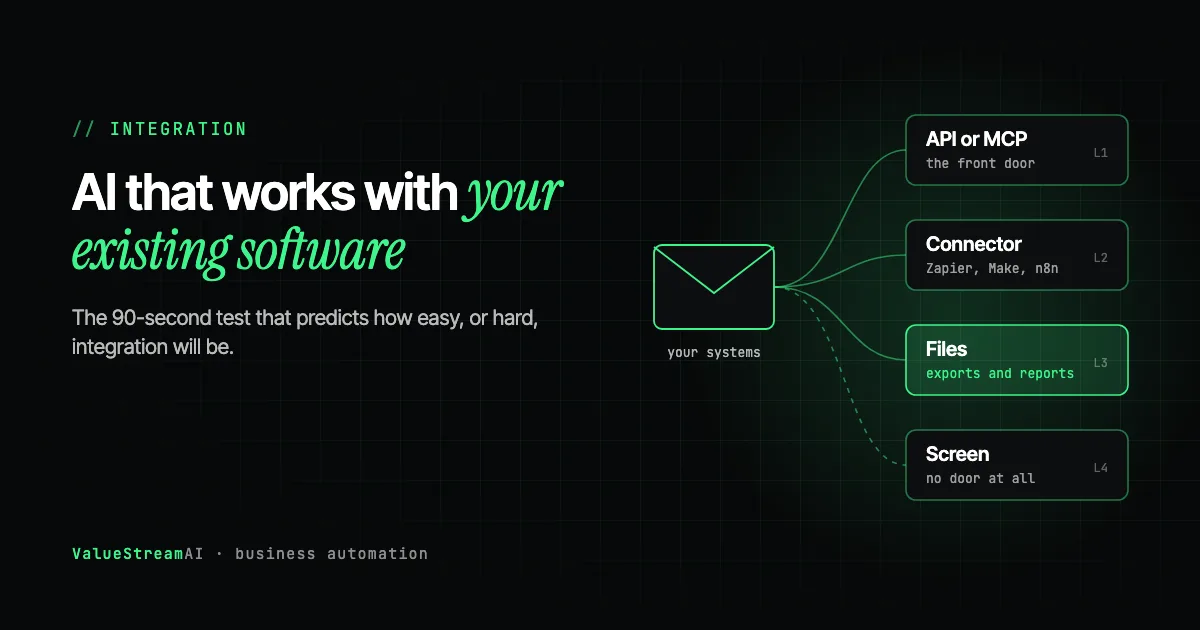
Can AI automation work with your existing software? Almost always, yes. You rarely need to replace your CRM, accounting package, booking system or the industry software your team has used for a decade before AI can help. What changes from one business to the next is not whether integration is possible, but how cleanly it can be done, and that decides most of the cost and most of the ongoing maintenance.
This guide gives business owners a way to predict that before talking to any vendor. It covers the 90-second test that tells you whether your systems will be easy or hard to automate, the four ways AI connects to existing software, what to do when an old system has no way in, and what each route costs to build and keep running.
| Metric | 2026 Benchmark |
|---|---|
| Time to run the integration feasibility test | About 90 seconds per system |
| Mainstream cloud tools with public APIs | Most CRMs and accounting packages (HubSpot, Salesforce, Xero, QuickBooks Online) |
| MCP, the open standard for connecting AI to tools | Introduced by Anthropic, November 2024 |
| Our scoped integration pilot starts at | $5,000 |
| US admin labour cost (BLS, May 2025) | $22.86/hour, $47,540/year base pay |
Why Owners Worry About Integration, and Why They Usually Should Not
The fear is reasonable. You have heard stories of software projects that ballooned because "the systems did not talk to each other," and your business runs on a mix of cloud tools, a few spreadsheets and one or two older applications that nobody fully understands. If AI means ripping that out, it is not worth the disruption.
The good news is that AI automation is built to sit on top of what you have. It reads from your existing systems, makes a decision or prepares a draft, and writes back into them. Your team keeps using the same screens. The question is only which door the automation uses to get in.
The less good news is that integration is where most of the surprises in an AI project come from. In our experience, the most commonly overlooked blocker is not the AI. It is discovering halfway through a build that the core system has no API, that a vendor controls the credentials, or that the contractor who built an internal tool three years ago left no documentation. Finding that out in week one costs an afternoon. Finding it out in week seven costs the project.
What assistant connectors already reach, and what they do not
The built-in assistants now connect to a lot of mainstream software on their own. ChatGPT's connectors cover tools such as Gmail, Outlook, Google Drive, SharePoint, Slack, Microsoft Teams and Salesforce. Copilot reaches across Microsoft 365, and Gemini across Google Workspace. If your question is "can staff ask AI about what is in our email, documents and CRM," a business-tier assistant with connectors may already answer it, and you should try that before paying for an integration.
What those connectors do not reach is usually where the money is: the accounting package that is not on the list, the industry system installed on a desktop, the supplier or insurer portal behind a login, the database a contractor built. And reaching a system is not the same as running a process in it. An assistant reads when someone asks; it does not post 400 invoices into your accounts system overnight, match each one against an order, and log what it did. The rest of this guide is about that second kind of integration.
The 90-Second Integration Test Any Owner Can Run
You do not need technical knowledge to predict how hard integration will be. List each core system your business runs on and, for each one, answer one question: does it offer an API, an MCP server, or a documented integration path?
- 01List your core systems
CRM, accounting, booking, stock, email, line-of-business software.
- 02Search the vendor's site
Look for API, developers, integrations, MCP or webhooks pages.
- 03Check access
Is the API on your plan? Do you hold the admin credentials?
- 04Mark each system
Door, side door, window, or nothing. That map predicts your cost.
Search the vendor's website for pages called "API," "developers," "integrations," "webhooks" or "MCP." The help centre usually answers it directly. Then mark each system:
- Door: a documented API or MCP server. Software can connect directly and reliably.
- Side door: listed on Zapier, Make or n8n, or has scheduled exports and webhooks.
- Window: no integration, but you can export files or reports by hand.
- Nothing: the only way to get data in or out is through the screen.
In our experience, when the key tools in a workflow are doors, AI automation is predictable to scope, quicker to build, and far less likely to break when the vendor ships an update. When they are windows or nothing, integration is still possible, but the project changes shape: it costs more and needs more maintenance.
Check the API is actually on your plan
One trap catches many owners: a vendor advertises an API, but it is only included on a higher pricing tier. Check your plan before assuming the door is open. The same goes for credentials: if an outside IT provider or a former contractor holds the admin login, getting access can take longer than building the automation.
Do you own the admin and API credentials, or does a vendor or ex-contractor control them?
For custom software, is there source code, documentation, and anyone who can still answer questions?
Many vendors only include API access on higher plans. Check before you assume it is there.
The Four Ways AI Connects to Your Existing Software
Route 1: an API or MCP server (the front door)
An API is a documented way for one piece of software to read from and write to another. Most modern cloud tools have one. An MCP server is a newer, AI-specific version of the same idea: Model Context Protocol is an open standard, introduced by Anthropic in November 2024, that lets AI systems connect to tools and data in a consistent way, and many vendors now publish MCP servers alongside their APIs.
When your systems have either, an automation connects through the door the vendor built on purpose. It is the cheapest route to build, the most reliable to run, and the least likely to break. For a technical view of how agents use these connections, see AI agent tool integration; for a plain-English explanation aimed at managers, see webhooks and APIs explained.
Route 2: a connector platform (the side door)
Zapier, Make and n8n offer pre-built connectors to thousands of tools. For simple, linear workflows between mainstream applications, they are often all you need, and our free automation templates library has verified examples you can import. Their limits show at volume and with complex logic: per-task pricing, limited error handling, and only the actions the connector exposes.
Route 3: files and exports (the window)
Many older systems cannot be connected to directly but can export a CSV, send a scheduled report by email, or drop files into a shared folder. AI automation can read those exports, do the work, and write the results into a system that does have a door. It is less real-time, but often perfectly adequate for daily or weekly processes.
Route 4: operating the screen (no door at all)
Some software offers no API, no connector and no export. Industry-specific desktop applications, older on-premise systems, some government or insurer portals. Here, automation operates the screen the way a person does: opens the application, reads what is displayed, clicks and types.
This works, and sometimes it is the only option, but it is more brittle. When the vendor moves a button, renames a field or redesigns a page, the automation breaks and someone has to fix it. It is the difference between a door and a window you have to climb through every time.
We have done this in production more than once. A medical billing company received patient documents through Egress secure email, which has no developer API; we built a system that opened the secure messages the way a staff member would and turned the attachments into structured records, described in our secure email automation case study. A private practice was locked inside a clinical system with no CSV download, no API and no export menu; we moved its entire patient registry out anyway, described in our legacy EHR data extraction case study.
Screen automation has improved with AI. Computer-use models can now read a screen and decide where to click, rather than relying on fixed coordinates. Microsoft's Fara-7B is an open, MIT-licensed example that can run locally, which matters when you do not want screenshots of your systems sent to a cloud provider. Our directory is candid about its limits: computer-use agents need human checkpoints, because their failures are silent. The market is moving the same way; in October 2026, Minicor raised a seed round to turn legacy desktop software into callable APIs, a sign of how common the no-door problem is.
If the system has an API or MCP server, connect directly. If not, check for a connector on Zapier, Make or n8n. If not, check whether it can export files or reports. If none of these exist, operate the screen like a person, with human checkpoints and budgeted maintenance.
Can AI Transfer Data Between Two Pieces of Software?
Yes. This is one of the most common reasons businesses automate in the first place. The same customer details typed into the CRM, then the quoting tool, then the accounts package is three times the work and three chances for error.
The difficulty is rarely moving the data. It is matching it. In most businesses we work with, the same customer appears in different systems under slightly different names, with different identifiers and no shared key. An automation that copies data without a matching rule creates duplicates faster than any person could. So a good data transfer automation always includes a step that decides which records are the same thing. We cover this in how to automate data entry and copy-paste work.
This scattered data is also why a ChatGPT or Copilot subscription often cannot answer questions about your own business. The model is a capable reader that has never been given the filing cabinet. Somebody has to extract the information from the systems where it lives, make it consistent, and put it where the AI can reach it. That unglamorous step is what makes every later automation cheaper.
What About Large Systems Like SAP, or Custom-Built Software?
Large enterprise systems such as SAP, Oracle or Microsoft Dynamics have extensive APIs, but access is often controlled by licensing, IT policy or an implementation partner. The integration itself is usually well documented; the paperwork can be slower. See SAP automation.
Custom-built software is the most variable. If you have the source code and documentation, adding an API can be straightforward. If the original developer has gone and nobody understands the system, you face an effective lock-in: not because a vendor enforces it, but because nobody inside the business can work with it safely. That is when screen automation or a careful data extraction project becomes the practical route.
Spreadsheets deserve a mention because they quietly run many businesses. Cloud spreadsheets such as Google Sheets and Excel on Microsoft 365 have APIs and connect easily. A spreadsheet on one person's desktop, updated by hand every Friday, is a process to fix rather than a system to integrate.
Human Hours vs Automation: What Each Route Costs to Run
Here is one moderate workflow, copying and checking order details between two systems, priced both ways, with the build and maintenance shown honestly for each route. These are our estimates, not client measurements.
The assumptions. The workflow takes 15 hours a week by hand, at $22.86 an hour (BLS, May 2025, administrative assistants, base pay), so 780 hours and about $17,800 a year. After automation, 15% of the hours remain for exceptions and spot-checks: 117 hours, about $2,680. Build and maintenance hours by route are our estimates for a workflow of this size.
| Route | Indicative build | Maintenance hours, year one | Human time after automation | Main risk |
|---|---|---|---|---|
| API or MCP | ~60 hours | ~15 | ~117 hours | Vendor changes the API version |
| Files and exports | ~80 hours | ~25 | ~117 hours | Export format changes, delays |
| Screen automation | ~120 hours | ~60 | ~117 hours | Breaks on any redesign |
In every route, the business saves roughly 660 hours a year of manual work. What changes is how much it costs to get there and stay there. Screen automation can take twice the build effort and several times the maintenance of an API route, which is why the 90-second test is worth doing before anyone quotes.
The other side of the ledger. Scoped integration pilots with us typically fall in our $5,000 to $15,000 range, with screen automation and legacy systems toward the top. Maintenance should be budgeted as an ongoing cost, not a surprise. Run your own figures in the hire vs automate calculator.
What the numbers leave out. Data entered the same day instead of in a weekly batch, and duplicate records avoided. Both often matter more than the hours.
How Much Does AI Integration Cost?
| Situation | Typical cost | Notes |
|---|---|---|
| Two mainstream tools with connectors | Free to a few hundred dollars a month | DIY with a connector platform |
| Several tools with APIs, some logic | $5,000 to $15,000 | Scoped custom pilot |
| A legacy system with no API in the workflow | Upper end of $5,000 to $15,000, or more | Screen automation or extraction, more maintenance |
| Many systems, a shared data foundation | $15,000 to $40,000+ | Departmental build or private deployment |
These follow our published tiers on the pricing page; for the complete picture see AI automation cost: the complete business owner's guide. The automation quote tool gives a scoped estimate, and our AI automation development service covers how integration projects run.
How to Prepare Your Systems Before Talking to a Vendor
- Run the 90-second test on every system in the workflow you want to automate.
- Find the credentials. Confirm you, not a former contractor or IT provider, control the admin and API logins.
- Check your plan includes API access.
- Gather documentation for any custom software, and find out whether anyone can still answer questions about it.
- Write down the workflow in plain steps. Our automation audit guide shows how.
A vendor who quotes before seeing your systems is guessing. A good one will ask these questions in the first meeting. If they do not, read what an AI automation proposal should include before signing anything.
Free resources. If your systems pass the 90-second test, browse our verified data sync templates and n8n templates to see what a connector route looks like in practice. The free tools hub has the calculators for pricing it.
The Competitor Pulse Check
| Factor | ValueStreamAI Approach | Typical Integration Pitch |
|---|---|---|
| Feasibility check | 90-second API test before any quote | "We integrate with everything" |
| Systems with no API | Screen automation, done in production | Replace the system |
| Maintenance | Estimated per route, up front | Not discussed |
| Data matching | Built in to prevent duplicates | Copy and hope |
| Credentials and access | Checked in week one | Discovered mid-build |
| Pricing | Published tiers from $5,000 | Day rates |
| Overlap with Copilot, ChatGPT or Gemini | Builds only what built-in assistants cannot: unattended, cross-system, checked, private | Often rebuilds drafting and summarising you already pay for |
Frequently Asked Questions
Can AI automation work with existing software?
Yes. AI automation can usually work with existing software through an API, an MCP server, a connector platform, file exports, or by operating the screen like a person. You rarely need to replace systems; the route your software allows decides the cost and maintenance.
Can AI work with software that has no API?
Yes. When software has no API, AI automation can read exported files or operate the screen the way a person does, clicking and typing in the application. Screen automation works but is more fragile and costs more to maintain, because it breaks when the vendor changes the screen.
How do I know if my software can integrate with AI?
Check whether each system offers an API, an MCP server, webhooks or a listing on Zapier, Make or n8n. Search the vendor's website for developer or integrations pages, confirm API access is included on your plan, and confirm you control the admin credentials.
Can AI update my CRM automatically?
AI can update most CRMs automatically, because mainstream CRMs such as HubSpot, Salesforce and Pipedrive have APIs. A good automation also matches records so it updates existing contacts instead of creating duplicates, and logs every change.
What is an MCP server?
An MCP server is a connection point that lets AI systems use a software tool's data and actions in a standard way. Model Context Protocol is an open standard introduced by Anthropic in November 2024, and many vendors now publish MCP servers alongside their regular APIs.
How much does it cost to integrate AI with existing systems?
Integrating AI with existing systems ranges from free to a few hundred dollars a month for simple connector setups, to $5,000 to $15,000 for a scoped custom pilot, and $15,000 to $40,000 or more when many systems or a legacy application with no API are involved.
What's Next
Spend ten minutes this week running the 90-second test on your core systems. The map you end up with will tell you more about the cost of AI in your business than any vendor demo.
→ Read the complete AI for small business guide.
→ See realistic durations in how long AI automation takes to implement.
→ Or talk to us and we will review your systems map with you before anyone quotes.
Muhammad Kashif is co-founder of ValueStreamAI, leading technical delivery and AI strategy. He designs and ships custom agentic AI and healthcare automation systems for clients across the US and UK. More about Muhammad Kashif →