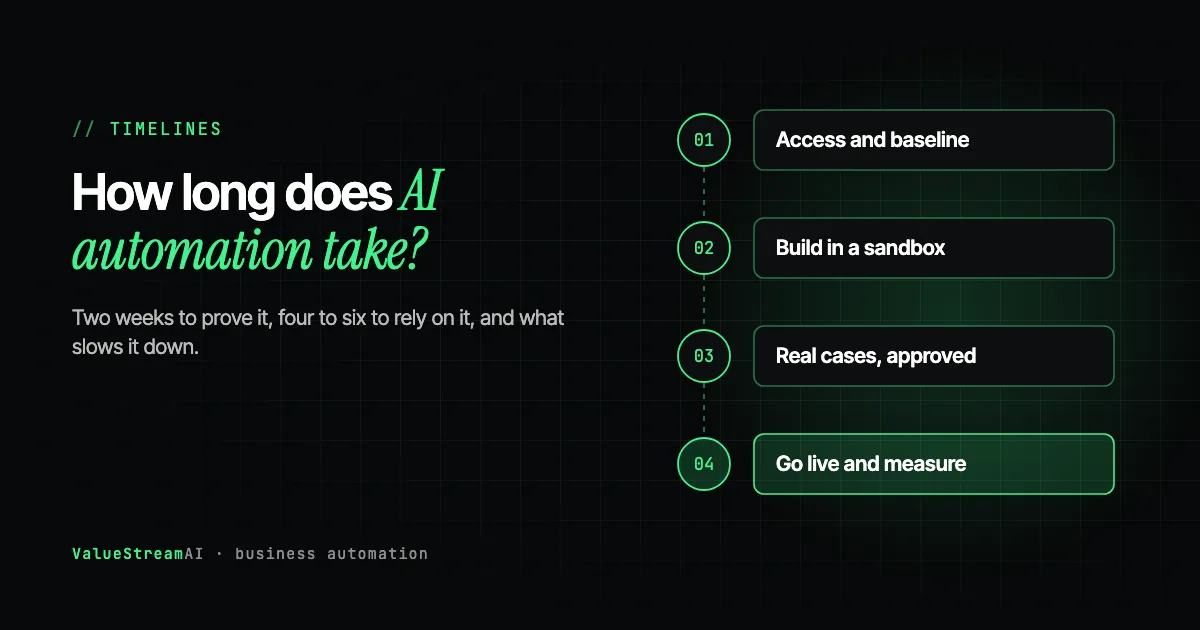
How long does AI automation take to implement? For most established businesses, the honest answer is: about two weeks to prove a pilot is worth doing, four to six weeks to put one workflow into reliable production, eight to twelve weeks for a departmental build with several connected workflows, and two to three months or more for multi-agent systems or private AI deployments. The biggest variable is rarely the AI. It is how quickly the project can get access to your systems and agree what a correct result looks like.
This guide explains those timelines in plain English: what happens in each phase, why AI projects take longer than a demo suggests but less time than a traditional software project, what causes delays, and what you can do before the project starts to make yours faster.
| Metric | 2026 Benchmark |
|---|---|
| Proof-of-value pilot | 14 days (our pilot format) |
| One workflow in production | 4 to 6 weeks |
| Departmental build | 8 to 12 weeks |
| Multi-agent or private AI | 12+ weeks |
| US admin labour cost (BLS, May 2025) | $22.86/hour, $47,540/year base pay |
One timeline is zero. If what you want is individual help with writing, summarising or research, Copilot, Gemini, ChatGPT and Claude already do it on business plans. The timeline is the time it takes to buy seats, set your rules and run a training session: days, not weeks. Everything below is about the work those assistants cannot do: workflows that run on their own, across several of your systems, with checks and approvals built in.
AI Automation Timelines at a Glance
| Project type | Typical duration | What you get at the end |
|---|---|---|
| Proof-of-value pilot | About 2 weeks | Evidence that one automation beats your baseline, and a decision to scale or stop |
| One production workflow | 4 to 6 weeks | One workflow running reliably on live data, with monitoring and exception handling |
| Departmental build | 8 to 12 weeks | Several connected workflows across a team, such as finance or customer service |
| Multi-agent or private AI | 12+ weeks | Systems that coordinate several AI agents, or AI running on your own infrastructure |
| Foundation and transformation | 6 to 8 months | A shared data layer, then use cases built on it in sequence |
The two-week and six-week numbers are not in conflict. A pilot answers "is this worth it?" against a baseline, often with a person approving every output. A production workflow answers "can we rely on this every day without watching it?" The second takes longer because reliability is earned through real cases, not declared. We walk through the pilot day by day in what a 14-day AI pilot actually looks like.
Why AI Automation Takes Longer Than the Demo, and Less Than You Fear
Owners usually arrive with one of two expectations. Some have watched a slick demo on social media and expect a working system in a few days. Others remember a software project that took a year and expect the same.
Both are wrong, for different reasons.
The demo is misleading because it shows one user, a perfect input and no error handling. A real workflow runs hundreds of times a day against your actual systems, meets inputs nobody anticipated, and has to recover when a connected system is slow or returns something unexpected. That is where most of the work sits.
The year-long fear is outdated because building software is now much faster than it was. Teams working natively with AI-assisted development deliver in weeks what used to take months. Where a traditional development shop still quotes six-month waterfall timelines for AI work, ask how their delivery time has changed in the last eighteen months. A genuine answer should show it shrinking.
The reason AI automation is different from ordinary software is that it makes decisions, and decisions have to be right across the full range of real inputs. Building the system is one part. Testing it against real cases, finding the unexpected failures, and refining it is the larger part. In our experience, the first hundred real interactions with any AI system almost always surface a handful of failure modes that weeks of internal testing missed, because real customers and real documents do not follow the expected path.
What Happens During an AI Automation Project, Week by Week
Here is a typical single-workflow project, the most common first engagement for a business with 20 to 100 people.
Week 1: discovery and access
The workflow is mapped step by step. Every system involved is checked for an API or other way in. Credentials are obtained. And, crucially, the current performance is recorded: how long the task takes now, how often it goes wrong, how much it costs. Without that baseline, nobody can say later whether the project worked.
This is also when the people involved agree what a correct output looks like. It sounds obvious. In practice, it is the conversation most often skipped, and the most expensive one to have later. The frustrating feedback "it is working as designed, but it is not what we wanted" almost always traces back to a definition of correct that was never written down.
Weeks 2 to 3: build in a sandbox
The automation is built and tested against a copy of your data or a test environment, never your live CRM or accounts first. We have been called in to recover businesses from agents that wrote bad data into a live system or sent real notifications during what was meant to be a test. A sandbox phase prevents that.
Weeks 3 to 5: real cases with human approval
The automation runs on real work, but a person approves every output before it takes effect. This is where the unexpected failures appear and get fixed: the supplier who formats invoices differently, the customer who replies in two languages, the order that does not fit any category.
Weeks 5 to 6: go live and measure
Once outputs are reliably right, approval moves from every item to exceptions only. Monitoring and logging are in place. Performance is compared against the week-one baseline. Then you decide: expand to the next workflow, refine, or stop.
Week one maps the workflow, checks system access and records a baseline. The automation is built in a sandbox, then run on real cases with a person approving every output. Failures found are fixed and re-tested. When outputs are reliable, the automation goes live with approval on exceptions only and is measured against the baseline.
Why Larger Projects Take Two to Three Months or More
Multi-agent systems, where several AI components coordinate on a process, and private AI deployments, where models run on your own infrastructure, take longer for a specific reason: each cycle of build, test on real users, discover failures and refine has to happen several times before the system can run on its own at scale. For enterprise-grade multi-agent workflows, two to three months is a realistic minimum in our experience. Anyone promising less is usually describing a demo.
The longest engagements, six to eight months, are not long builds. They are sequences. A business sitting on scattered data across many old systems first needs that data extracted, made consistent and put somewhere usable, and then each use case is built on top. The first weeks go on access and inventory. Then the hard part, working out which records across different systems are the same customer, order or supplier. Then the first use case, then the second, which is where the investment starts to compound.
To be clear about who should not buy that: a business with a few clean systems that all have APIs and one clear workflow to automate should buy a scoped build, not a long partnership. Our AI agent ecosystem case study shows what the longer shape looks like when it is genuinely needed, for a 40-doctor network.
What Slows AI Automation Projects Down
Almost every delay we see falls into one of five categories. None of them is the AI.
System access and credentials. The most common delay by far. The API is on a higher plan you do not have, the admin login belongs to an IT provider, or the contractor who built a key tool has moved on. Each can add weeks.
No agreed definition of correct. If the operations lead and the customer service manager disagree on what a good output looks like, the project stalls in rework.
Security or legal review. Necessary in regulated businesses, but slow if it starts late. One implementation guide estimates that a security and data processing review adds 10 to 30 days unless it begins on day one. Start it at kickoff.
Legacy systems with no API. Workable through screen automation, but slower to build and test. See AI automation and your existing software.
Messy or scattered data. The same customer spelled four ways across four systems, or key information that lives only in someone's inbox.
How to Make Your AI Automation Project Faster
Most delays can be removed before the project starts:
- Run the 90-second API test on every system in the workflow, and confirm the API is on your plan.
- Collect credentials in advance, and confirm you control them.
- Write down the workflow in plain steps, including the awkward cases. Our automation audit guide shows how.
- Agree what correct looks like with everyone who will judge the result, in writing.
- Name one decision-maker who can answer questions within a day.
- Start any security or legal review on day one.
- Set your AI rules on tools and data first, using our AI policy template.
Human Hours vs Automation: The Cost of Waiting
Timelines matter because every week the workflow is still done by hand has a cost. These are assumptions, not client figures.
The assumptions. A workflow takes 20 hours a week by hand at $22.86 an hour (BLS, May 2025, administrative assistants, base pay). Once automated, 15% of the hours remain for review (our estimate), so each week of delay costs 17 hours that automation would have removed, about $389.
| Delay | Hours still done by hand that automation would remove | Cost of the delay |
|---|---|---|
| 2 weeks | 34 hours | ~$780 |
| 6 weeks | 102 hours | ~$2,330 |
| 12 weeks | 204 hours | ~$4,660 |
The amounts are modest, which is the point: do not rush a project to save a few weeks of manual work. A rushed launch that skips real-case testing costs far more in errors and lost trust than the delay ever would. The one exception is speed-sensitive work, such as responding to new leads, where every week of slow replies may be losing business you cannot measure in hours. See AI lead follow-up.
Run your own figures in the ROI calculator or the hire vs automate calculator.
How Timelines Relate to Cost
Duration and cost move together, because most of the cost is skilled time.
| Project type | Typical duration | Typical cost |
|---|---|---|
| Proof-of-value pilot | About 2 weeks | $5,000 to $15,000 |
| One production workflow | 4 to 6 weeks | $5,000 to $15,000 |
| Departmental build | 8 to 12 weeks | $15,000 to $40,000 |
| Multi-agent or private AI | 12+ weeks | $40,000+ |
These are our published tiers; see the pricing page and AI automation cost: the complete business owner's guide. For a scoped estimate of time and cost on your own workflow, use the automation quote tool. Our AI automation development service explains how a project runs.
Questions to Ask a Vendor About Timelines
- What happens in each week? A credible plan names phases, not just an end date.
- When does it touch live data? The answer should be after a sandbox phase.
- How do you handle failures found in real cases? Look for a specific process, not reassurance.
- What do you need from us, and by when? Delays usually come from the client side; a good vendor says so up front.
- Who will be working on it? The person on the sales call should be reachable during delivery.
For the full checklist, see what an AI automation proposal should include and how to tell if an AI agency can actually build it.
Free resources. While you prepare, use our free tools hub to put numbers on the workflow, and check our free automation templates: if a verified template already covers your case, the timeline may be days rather than weeks.
The Competitor Pulse Check
| Factor | ValueStreamAI Approach | Typical Agency Timeline |
|---|---|---|
| Pilot vs production | Distinguished clearly: 2 weeks vs 4 to 6 | One date for both |
| Sandbox phase | Always, before live data | Often skipped |
| Real-case testing | Built into the plan | "UAT" at the end |
| Delays | Named up front, with client actions | Discovered mid-project |
| Who should not buy a long engagement | Stated plainly | Rarely said |
| Pricing | Published by tier | Quoted after discovery |
| Overlap with Copilot, ChatGPT or Gemini | Builds only what built-in assistants cannot: unattended, cross-system, checked, private | Often rebuilds drafting and summarising you already pay for |
Frequently Asked Questions
How long does AI automation take to implement?
AI automation typically takes about two weeks to prove a pilot, four to six weeks to put one workflow into reliable production, eight to twelve weeks for a departmental build, and twelve weeks or more for multi-agent systems or private AI. Access to systems and agreeing what correct looks like are the biggest variables.
How long does it take to automate a small business?
Automating a small business happens one workflow at a time. The first workflow usually takes four to six weeks to reach reliable production. Most businesses then add a workflow every month or two, so meaningful automation across several areas takes a few months rather than a single project.
What happens during AI automation implementation?
Implementation starts with mapping the workflow, checking system access and recording a baseline. The automation is built in a test environment, then run on real cases with a person approving every output. Failures are fixed, and once outputs are reliable it goes live with approval on exceptions only and is measured against the baseline.
Why do AI automation projects take longer than demos suggest?
Demos show one user, a perfect input and no error handling. Real workflows run hundreds of times a day, meet unexpected inputs and must recover from failures in connected systems. Testing against real cases and fixing what they reveal is most of the work.
What causes delays in AI automation projects?
The most common delays are getting access to systems and credentials, no agreed definition of a correct output, late security or legal reviews, legacy systems with no API, and messy or scattered data. Most can be removed by preparing before the project starts.
Can AI automation be done in two weeks?
A proof-of-value pilot can be done in about two weeks, showing whether an automation beats your current baseline. Putting that workflow into reliable, unsupervised production usually takes four to six weeks, because reliability has to be proven on real cases.
What's Next
Before you ask anyone for a timeline, run the 90-second API test on your systems and write down what a correct result looks like. Those two steps remove most of the delays in this guide.
→ Read the complete AI for small business guide.
→ See exactly what the first two weeks involve in what a 14-day AI pilot looks like.
→ Or talk to us for a timeline based on your actual systems.
Muhammad Kashif is co-founder of ValueStreamAI, leading technical delivery and AI strategy. He designs and ships custom agentic AI and healthcare automation systems for clients across the US and UK. More about Muhammad Kashif →