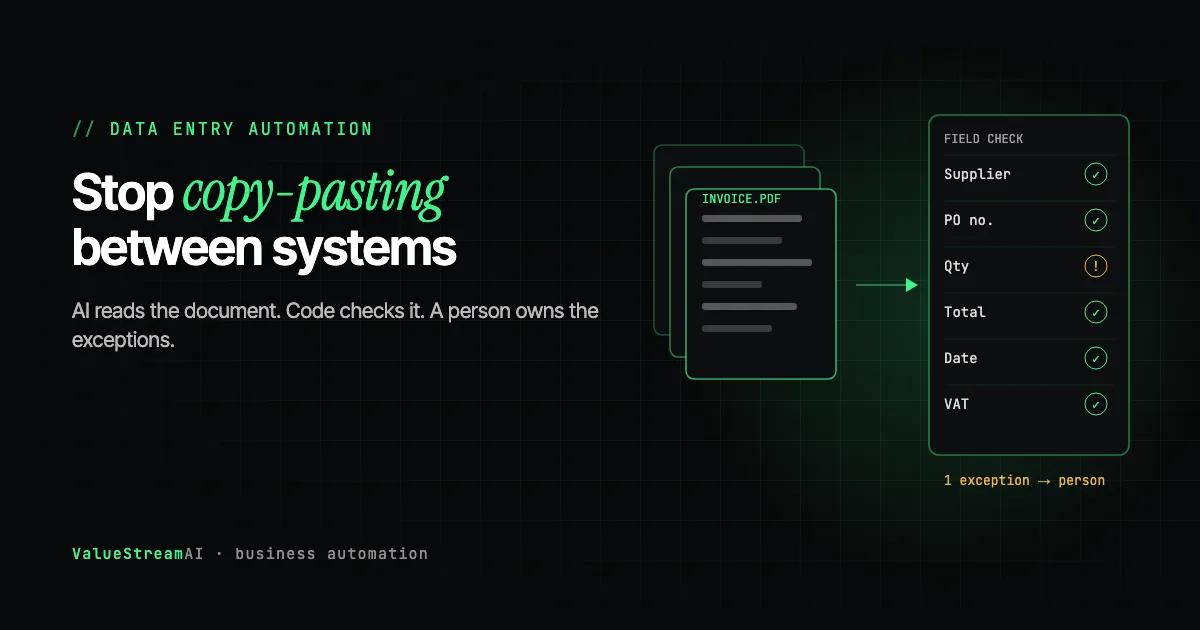
AI data entry automation is the most reliable first AI project for most established businesses, because the work is repetitive, measurable and already costing you real money. If someone in your office spends part of every day copying details from emails, PDFs or web forms into a CRM, an accounting package or a spreadsheet, that work can almost certainly be automated, and in 2026 the hard part is no longer reading the document.
The hard part is everything around the reading: getting the data into systems that may not want to let software in, catching the errors that were never misreads in the first place, and deciding what a person still needs to check. This guide covers all of it in plain English, with real costs, so you can judge any quote you receive.
| Metric | 2026 Benchmark |
|---|---|
| US median wage, data entry keyers | $19.88/hour (BLS, May 2025) |
| US median wage, administrative assistants | $22.86/hour (BLS, May 2025) |
| Manual entry at 3 hours a day costs | ~$14,900 a year at the keyer median |
| Our scoped data entry pilot starts at | $5,000 |
Can AI Automate Data Entry?
Yes. AI can read an email, a scanned PDF, a photo of a receipt or a web form, pull out the fields you care about (names, amounts, dates, order numbers, addresses), and enter them into your other systems. It can do this for documents it has never seen before, without anyone setting up a template for each layout. That last part is what changed. Older OCR tools needed a template per supplier; a modern vision-language model reads a new layout the way a person does.
What AI cannot do on its own is decide whether the data it read is right. A perfectly read invoice can still be for goods you never received. That distinction shapes everything else in this guide, and it is the reason a good data entry automation is part reading, part checking, and part a person handling the exceptions.
If you have not yet worked out which data entry tasks are worth automating, start with the two-week automation audit. The "follow the data" step finds every place the same information is typed twice, which is exactly the list you need here.
Why ChatGPT or Copilot will not do your data entry for you
It is a fair question: if ChatGPT can read an invoice you upload, why build anything? Because reading one invoice in a chat is not data entry. Data entry is every invoice, as it arrives, written into the right system, checked against the right records, with nobody opening a chat window.
- Someone still has to paste. A chat assistant reads what a person gives it. At 400 documents a month, that person is still doing the job.
- It does not write reliably into your systems. Assistant connectors focus on reading mainstream cloud tools. Writing into your accounting package, ERP or a desktop application, unattended, is not what they are built for, and ChatGPT's agent asks for confirmation before consequential actions.
- It does not check one document against another. The expensive errors are an invoice that disagrees with the purchase order, or the same customer under four names. That needs rules and lookups, not a better reader.
- It does not leave an audit trail. A finance process needs to show what was entered, from which document, checked against what, and who approved the exceptions.
So the commodity part (reading) costs you almost nothing now, and the part worth paying for is everything around it. That is how the rest of this guide is organised.
What Copy-Paste Work Actually Costs
Most owners underestimate data entry because it is spread across many people in small pieces. Ten minutes here, twenty there. Added up across a 40-person business, it is often one or two full-time jobs that nobody's title describes.
At the US national median for data entry keyers, $19.88 an hour (Bureau of Labor Statistics, May 2025, base pay), and 250 working days a year:
When the person doing the entry is an administrative assistant or an accounts clerk rather than a dedicated keyer, the hourly rate is higher. The US median for administrative assistants is $22.86 an hour (BLS, May 2025). The point is not the exact figure. It is that copy-paste work has a price, and that price is the ceiling on what automating it can save.
The Four Ways AI Gets Data Into Your Systems
Every data entry automation uses one of four routes to put data where it needs to go. Which route your systems allow decides most of the cost.
- 01Direct connection
Software talks to software through the door the vendor built.
- 02Connector platform
Pre-built connectors for mainstream tools; limited to what they expose.
- 03Read the files
AI reads PDFs, emails and exports, then writes into a system that has a door.
- 04Operate the screen
Software clicks and types like a person. Works, but breaks on redesigns.
Route 1: a direct connection (API or MCP)
When the destination system (your CRM, accounting package, ERP) publishes an API or an MCP server, automation writes into it directly, the same way the vendor's own integrations do. This is the cheapest, fastest and most stable route. HubSpot, Salesforce, Xero, QuickBooks Online and most modern cloud tools work this way.
Route 2: a connector platform
Zapier, Make and n8n offer pre-built connectors for thousands of mainstream tools. For simple, linear entry ("when a form is submitted, create a contact") they are often all you need, and our free automation templates library has verified, ready-to-import examples. The limits show up at volume and with complex logic: per-task pricing that grows with use, limited error handling, and no way to do something the connector does not expose.
Route 3: read the files, then write somewhere with a door
Much data entry starts with a document rather than a system: a PDF invoice attached to an email, a scanned form, an export from a supplier portal. AI reads the document, extracts the fields, and writes them into a destination that does have an API. This is the classic document processing pattern, covered in depth in AI document processing and invoice automation.
Route 4: operate the screen
Some systems have no API, no connector and no export button. Older line-of-business software, some industry-specific portals, desktop applications installed a decade ago. Here, automation has to operate the screen the way a person does: open the application, click into fields, type values, press save.
This works, and sometimes it is the only option, but it is more fragile. When the vendor moves a button or renames a field, the automation breaks and someone has to fix it. Budget for that maintenance.
We have done this route in production. For a medical billing company receiving patient documents through Egress secure email, which has no developer API, we built a system that opened the secure messages the way a staff member would and turned the attachments into structured records. The full story, including what did not work, is in our secure email automation case study. And when a private practice was locked inside a clinical system with no CSV download, no API and no export menu, we moved the entire patient registry out anyway, described in our legacy EHR data extraction case study.
A newer option is worth knowing about for screen automation where privacy matters. Microsoft's Fara-7B is an open, MIT-licensed computer-use model that can operate a web or desktop application locally, without sending screenshots of your systems to a third-party cloud. Our directory entry is honest about its limits: it needs human checkpoints, because computer-use agents fail silently and expensively when left unattended.
Reading Is Easy Now. Checking Is the Product.
Here is the position most data entry vendors will not print: extraction has become a commodity. Pulling fields from a document is now something a general vision model does well, and per-page prices keep falling. If a vendor's pitch is mostly about "99% accurate extraction," they are selling the cheap part.
The expensive errors in a back office are rarely misread fields. They are disagreements between documents that were each read correctly.
Both documents read perfectly. Only a check between them shows you are billed for 20 units you never received.
Typed into four systems four ways. Without a matching rule, automation creates duplicates faster than people do.
An estimate dated before the event it covers. Arithmetic in code catches this; a model often will not.
The invoice bills 120 units against a goods receipt for 100. The customer's name is spelled four different ways across four systems. A document is dated before the event it supposedly records. None of these is a reading error. A system that only extracts will enter all of them faithfully.
So the architecture that holds up is a split of responsibilities:
A document arrives and AI reads it into fields. Code then checks the fields against your other records and business rules, because dates, counts and totals are arithmetic. Records that pass are entered automatically. Anything that fails a check goes to a person, whose decision is logged.
The model reads. Code decides. A person owns every exception. Dates, quantities and totals are arithmetic, and language models are unreliable at arithmetic, so those checks belong in ordinary code. The model is used only for the part that needs understanding: reading an unfamiliar layout. And anything that fails a check goes to a named person rather than being silently entered or silently dropped. We go deeper into the matching pattern in purchase order and invoice matching automation.
Free and Open Models for Data Entry, and One Licence Trap
If your documents contain sensitive data (client financials, health records, legal files), you may not want them sent to a cloud AI provider at all. Open models you run yourself are a realistic option in 2026, and our free AI models directory lists them with honest notes on licence and hardware.
One of the most popular dedicated OCR models illustrates why the licence notes matter. HunyuanOCR from Tencent is strong at extraction from scanned archives. But its licence, the Tencent Hunyuan Community License, states that it does not apply in the European Union, the United Kingdom or South Korea. A business established in the UK or EU has no licence to use it at all. That is not a technicality you can work around; it is a model you cannot legally put into a commercial pipeline from those jurisdictions. Elsewhere, commercial use is permitted below a monthly active user cap.
This is the kind of detail that never appears in a "best free OCR tools" list, and it is exactly the kind that matters to a business owner. Before any free model touches your data, check three things: the licence, whether it allows commercial use in your country, and whether it sends any telemetry home by default.
For general reading and classification on modest hardware, Apache-licensed models such as gpt-oss-20b are a sensible default. The trade-offs between running your own model and using a cloud API are covered in self-hosted AI vs cloud APIs.
Common Data Entry Jobs and Which Route Fits
| Data entry job | Typical source | Typical destination | Usual route |
|---|---|---|---|
| Web enquiries into the CRM | Website form | HubSpot, Salesforce, Pipedrive | Connector or API |
| Supplier invoices into accounts | PDF in email | Xero, QuickBooks, Sage | Read the files, then API |
| Orders into the ERP or stock system | Email, portal export | ERP | Read the files; screen if no API |
| New hire paperwork into HR records | Forms, scanned IDs | HR system | Read the files, then API |
| Spreadsheet reconciliation | Two or more exports | A master sheet or system | Read the files, then code checks |
| Copying between two legacy apps | Desktop software | Desktop software | Operate the screen |
For lead and CRM entry specifically, see AI lead follow-up and CRM automation. For the HR version, our LinkedIn applicants HR automation case study sorted roughly 6,000 applicants into clean spreadsheets and CV folders in about two weeks.
Human Hours vs Automation: Form and Document Entry
Here is a common data entry workflow priced both ways. These are stated assumptions, not client measurements.
The assumptions. A business handles light (300), typical (1,000) or heavy (3,000) forms and documents a month. Each takes 5 minutes by hand: open, read, type into the system, check, file. The rate is $19.88 an hour, the BLS May 2025 national median for data entry keyers, base pay. After automation, 45 seconds per item remains on average for reviewing exceptions and spot-checks (our estimate; most items need no touch, a minority need a few minutes).
| Volume | By hand per year | Cost by hand | Human time after automation | Cost after |
|---|---|---|---|---|
| Light: 300 a month | 300 hours | ~$5,960 | ~45 hours | ~$890 |
| Typical: 1,000 a month | 1,000 hours | ~$19,880 | ~150 hours | ~$2,980 |
| Heavy: 3,000 a month | 3,000 hours | ~$59,640 | ~450 hours | ~$8,950 |
The other side of the ledger. A scoped data entry pilot typically costs $5,000 to $15,000 with us, depending on the route your systems allow. Screen automation sits at the higher end and carries more maintenance. If the AI reading runs on a cloud API, there is also a per-document processing cost, usually small at these volumes. At the light volume, an off-the-shelf tool is often enough, and we would tell you so.
What the numbers leave out. Errors caught before they reach your books, records entered the same day instead of in a Friday batch, and staff who are no longer doing the most tedious part of their job. Run your own numbers in the hire vs automate calculator.
How Much Does Data Entry Automation Cost?
| Approach | Typical cost | Right for |
|---|---|---|
| Connector platform, DIY | Free to a few hundred dollars a month in subscriptions | Simple, linear entry between mainstream tools |
| Off-the-shelf capture tool | Monthly subscription | Receipts and invoices into one accounting package |
| Scoped custom pilot | $5,000 to $15,000 | Several sources, validation rules, exceptions to a person |
| Departmental build | $15,000 to $40,000 | Many document types, several destination systems, legacy apps |
These are our published tiers; the full breakdown is on our pricing page and in AI automation cost: the complete business owner's guide. For a figure on your own workflow, try the automation quote tool. Our AI automation development service explains how a pilot runs from audit to production.
Free starting points. For simple, linear entry between mainstream tools, try our verified data sync templates and document processing templates before paying for a build. Our free tools hub has the calculators to price the result.
The Competitor Pulse Check
| Factor | ValueStreamAI Approach | Typical Data Entry Tool or Freelancer |
|---|---|---|
| What is sold | Reading plus checking plus exceptions | Extraction accuracy |
| Systems with no API | Screen automation, done in production | "Not supported" |
| Cross-document checks | Rules in code, before entry | Usually none |
| Sensitive data | Option to run open models privately | Cloud only |
| Licence diligence | Checked per model and jurisdiction | Rarely mentioned |
| Pricing | Published tiers from $5,000 | Per page, per task or hourly |
| Overlap with Copilot, ChatGPT or Gemini | Builds only what built-in assistants cannot: unattended, cross-system, checked, private | Often rebuilds drafting and summarising you already pay for |
Frequently Asked Questions
Can AI automate data entry?
Yes, AI can automate data entry by reading emails, PDFs, scanned forms and web submissions, extracting the fields you need and entering them into your CRM, accounting software or spreadsheets. A reliable setup also checks the data against your other records and sends anything that fails a check to a person.
Can AI extract information from PDF documents?
AI can extract information from PDF documents, including scanned ones and layouts it has never seen, without a template per supplier. Accuracy on clean documents is high, but the bigger risk is a correctly read document that disagrees with another record, which is why validation rules matter.
Can AI enter data into my CRM automatically?
AI can enter data into your CRM automatically when the CRM has an API or a connector, which most mainstream CRMs such as HubSpot, Salesforce and Pipedrive do. Matching rules are needed so the automation updates existing contacts instead of creating duplicates.
Can AI automate copy and paste work between applications with no API?
AI can automate copy and paste work between applications with no API by operating the screen the way a person does: opening the application, clicking into fields and typing values. It works, but it breaks when the vendor redesigns the screen, so it costs more to maintain than an API connection.
How much does data entry automation cost?
Data entry automation costs from free for simple connector setups to $5,000 to $15,000 for a scoped custom pilot with validation and exception handling, and $15,000 to $40,000 for a departmental build covering many document types and legacy systems. Screen automation of systems with no API sits at the higher end.
Is AI data entry accurate enough to trust?
AI data entry is accurate enough to trust when every extracted record is checked by rules in code before it is entered, and anything that fails goes to a person. Trusting extraction alone is the mistake, because many costly errors come from documents that disagree with each other, not from misreading.
What's Next
Pick the data entry task your staff complain about most, count how many times a month it happens, and multiply by the minutes. That number tells you whether this is a $300 connector job or a $10,000 pilot.
→ Read the complete AI for small business guide for where data entry fits in a wider plan.
→ Check whether your systems have a way in with our guide to AI automation and existing software.
→ Or get in touch and we will look at your actual documents and systems and tell you which route fits.
Muhammad Kashif is co-founder of ValueStreamAI, leading technical delivery and AI strategy. He designs and ships custom agentic AI and healthcare automation systems for clients across the US and UK. More about Muhammad Kashif →