Run any website through an SEO audit tool and you will get a report with hundreds of warnings: missing meta descriptions, long titles, 404 errors, redirect chains, duplicate content, slow pages. Most business owners do one of two things with it: panic, or ignore the whole thing. Both are mistakes, because a handful of those warnings can hide a site from Google completely, and most of the rest do not matter at all.
This guide explains what a technical SEO audit actually checks, in plain English, which warnings deserve attention and which do not, what an audit costs, and what fixing the right things did for a real online store with more than 100 problem pages.
| Metric | 2026 Benchmark |
|---|---|
| Good Largest Contentful Paint (Google, web.dev) | 2.5 seconds or less |
| Good Interaction to Next Paint | 200 ms or less |
| Good Cumulative Layout Shift | 0.1 or less |
| Screaming Frog free crawl limit | 500 URLs; paid licence £199 a year |
| Most common one-off SEO project fee (Ahrefs survey) | $2,501 to $5,000 |
The short answer. A technical SEO audit checks whether Google can find, crawl, render and index your pages, and whether anything on the site works against them: crawl blocks, redirect chains, orphaned pages, duplicate or thin content, slow pages, text crawlers cannot see, and broken structured data. The warnings that matter most are important pages not being indexed and accidental blocks. Many others, such as 404s nobody links to or slightly long titles, usually need no action. An audit is only worth paying for if the problems it finds get fixed.
Key takeaways
- Indexing comes first. A page Google has not indexed cannot rank, however good it is.
- Most warnings are noise. Google's own documentation says most 404s need no action.
- Large sites need audits most. Small mistakes multiply across thousands of pages.
- A report is not a result. Price the audit with the fixes, not instead of them.
- Measure with Search Console. Not with a tool's health score.
Why a Technical SEO Audit Matters
The answer is that content cannot rank if Google cannot reach it, and on most sites something is quietly stopping it.
On a five-page site you can check everything by hand. On a site with hundreds or thousands of pages (an online store, a directory, a business with a page for every service and city), structural mistakes hide, and they multiply. One discontinued category that redirects to another redirect affects every product that linked to it. One "noindex" tag left over from a staging site can hide a whole section.
This is the unglamorous part of SEO. It produces nothing a customer will see. It is also the part that decides whether the content, links and marketing work at all, which is why we start most engagements on existing sites here.
What an Audit Checks
1. Indexing
Search Console's page indexing report lists every URL Google knows about and whether it is indexed, with a reason if not. This is the most important single report in an audit. "Crawled, currently not indexed" usually means a page is too thin or too similar to another. "Discovered, currently not indexed" usually means Google has not got round to it yet. "Excluded by noindex" means a tag is blocking it. A healthy site looks like PK Transporters, a logistics company whose site we built: 38 pages indexed and 0 not indexed by mid-October 2026.
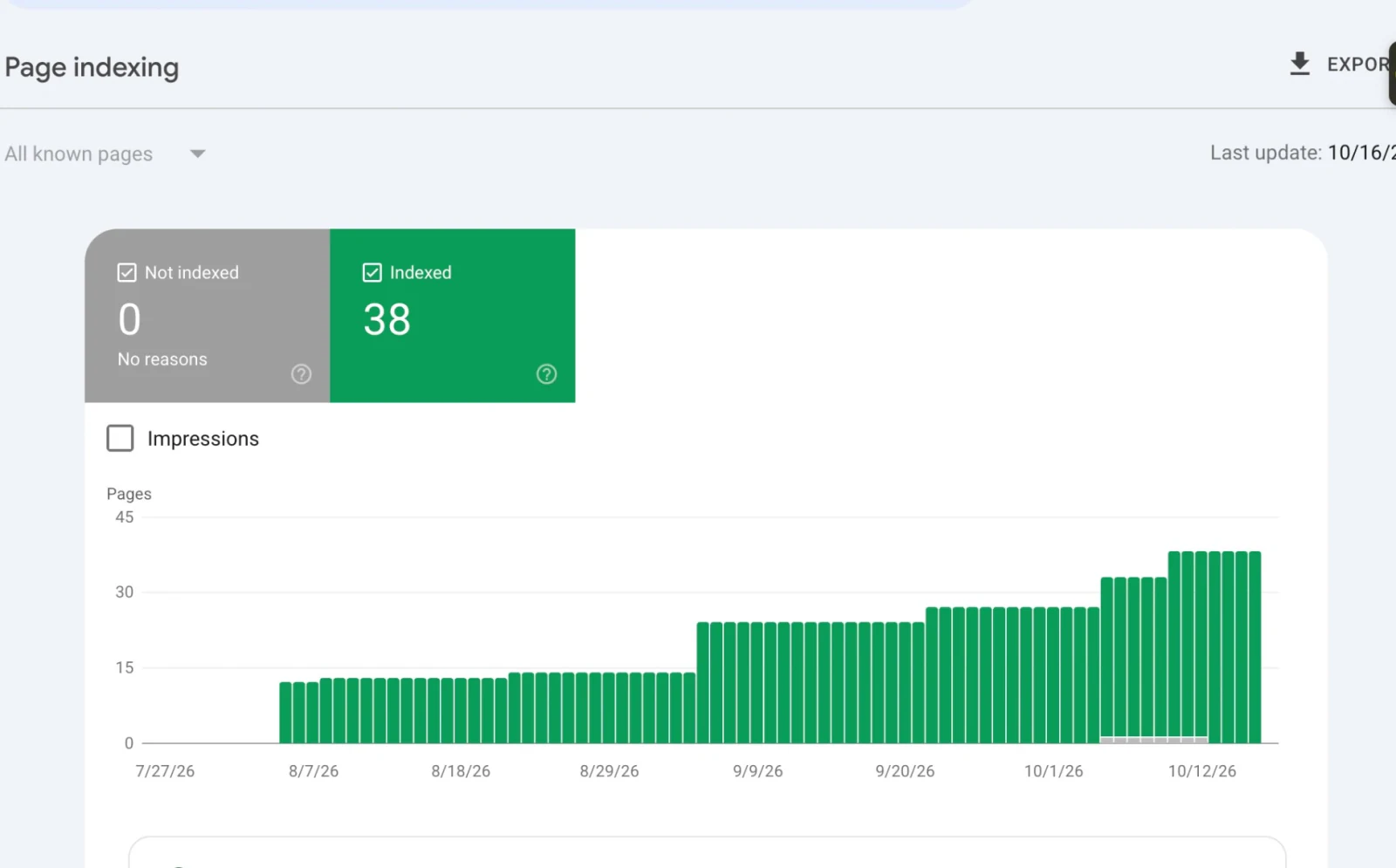
Google Search Console Page indexing, pktransporters.com, updated 16 October 2026: 38 pages indexed, 0 not indexed.
2. Crawl blocks
A robots.txt rule or a "noindex" tag that blocks pages that should rank, or a login wall in front of public content. These are rare, and catastrophic when they happen.
3. Redirects
When pages move, old URLs should redirect in one step to the closest new page. Chains (A to B to C), loops, and redirects to unrelated pages waste crawl time and lose some of the value of links pointing at the old URL. Google's redirect documentation recommends going straight to the final URL.
4. Internal links
Google discovers pages largely by following links from pages it already knows. Pages nothing links to (orphans) may never be found, and links pointing at redirected or deleted URLs waste the path.
5. Duplicate and thin content
Product pages with the manufacturer's description copied word for word, variants with near-identical text, and pages with too little content to say what they are for. Google picks one duplicate to show, often not the one you would choose.
6. Speed
Google measures real-world speed with its Core Web Vitals.
Per web.dev, a page is "good" when the main content appears within 2.5 seconds, the page responds to taps within 200 milliseconds, and the layout shifts by no more than 0.1, measured at the 75th percentile of real page loads. Speed is rarely the reason a page fails to rank at all, but a slow site loses visitors before they enquire.
7. Rendering
Some sites, especially those built with AI app builders or as single-page apps, build their text in the visitor's browser with JavaScript. Google can render JavaScript, but slowly, and many AI crawlers do not render it at all. The simple test: "View page source" and search for a sentence you can see on screen.
8. Structured data
Schema markup that tells Google what the business, product or article is. It must match what the page says. We cover the local version in local SEO schema for multi-location businesses.
Which Warnings Actually Matter
The answer: anything stopping important pages from being indexed matters a great deal; most cosmetic warnings matter very little.
Audit tools are built to find everything, so they report everything at similar volume. Google's own Search Console documentation is calmer. It says most 404 errors need no action unless you link to the missing page or list it in your sitemap; a page that is genuinely gone should return a 404. A meta description that is missing or a title a few characters over a tool's limit is a tidy-up, not an emergency.
| Warning | Usually means | Priority |
|---|---|---|
| Important page not indexed | Thin, duplicate or blocked | Fix first |
| Noindex or robots.txt on a page that should rank | A leftover setting | Fix first |
| Redirect chain on a URL other sites link to | Lost link value and crawl time | Fix soon |
| Orphaned pages | Google may never find them | Fix soon |
| Duplicate product descriptions | Pages competing with each other | Fix on pages that sell |
| Missing meta description | Google writes its own snippet | Tidy-up |
| 404 on a URL nobody links to | Normal | Usually ignore |
| Title slightly over a tool's limit | Cosmetic | Usually ignore |
A Real Audit: DSL Warehouse
DSL Warehouse is an online store for networking and telecoms equipment, with around 4,450 product URLs in its sitemap today. Our audit covered more than 100 pages and fixed three kinds of problem: redirection issues, internal linking issues and content issues.
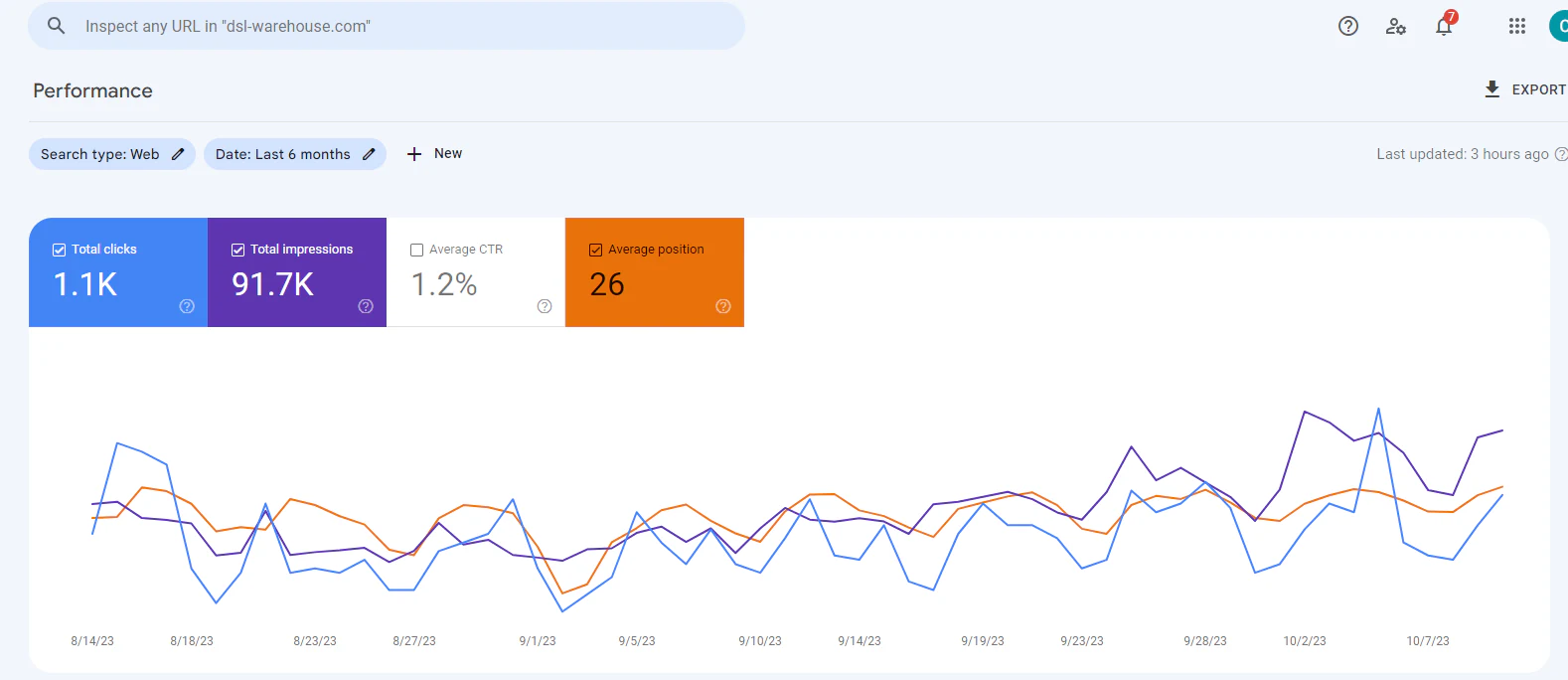
Google Search Console, dsl-warehouse.com. Data starts in mid-August 2023: 1.1K clicks, 91.7K impressions, 1.2% CTR, average position 26.
In about eight weeks of Search Console data, the store recorded 91,700 impressions and 1,100 clicks, with impressions still rising at the end of the window. The average position of 26 is typical for a large catalogue that appears for thousands of long-tail part-number searches. The full story is in the DSL Warehouse case study.
Start with the Search Console indexing report and a crawl of the site. Sort what they find into problems that stop important pages being indexed, problems that weaken pages, and cosmetic warnings. Fix the first group first, then the second on the pages that matter, leave most cosmetic warnings, and measure the result in Search Console.
Tools, Including the Free Ones
You do not need expensive software to start:
- Google Search Console (free): the indexing report, performance data and Core Web Vitals from real users. The most important tool, and the only one with Google's own data.
- PageSpeed Insights and Lighthouse (free; Lighthouse is open source): speed and Core Web Vitals for individual pages.
- Screaming Frog SEO Spider: a desktop crawler that finds redirects, broken links, duplicate titles and orphaned pages. Free for up to 500 URLs; a licence is £199 a year per its pricing page.
- Ahrefs Webmaster Tools and Semrush: site audits plus backlink and keyword data, with free tiers for verified sites.
The tools find problems. Deciding which ones matter, and fixing them on the live site, is the work.
What an Audit Costs
An Ahrefs survey of 439 SEO providers found the most common one-off SEO project fee was $2,501 to $5,000, and the average hourly rate about $111. A standalone audit from an agency often lands in that project range.
We do not sell audits as reports. Our audits are part of fixing the site: inside a build or rebuild from $5,000, or a marketing retainer from $900 a month. The reason is simple: a PDF of 400 warnings does not move a single ranking, and handing it to a busy web developer often means nothing changes for months. Our website and SEO packages guide explains what different budgets buy.
After the Audit: Keeping It Fixed
An audit fixes the site as it was on the day. Sites keep changing, and every change can reintroduce the same problems.
Catalogues create new redirects every week. When a product is discontinued or renamed, its URL needs a one-step redirect to the closest live product or category. A store that does this by habit never needs another 100-page clean-up; one that does not will need one every year or two.
Templates spread mistakes. A change to a product or location template affects every page built from it. Check a sample of pages after any template change, especially titles, canonical tags and structured data.
Watch the indexing report monthly. Search Console's page indexing report is the early warning. A sudden rise in "not indexed" pages, or a fall in indexed ones, usually traces back to a recent change. PK Transporters' report shows the healthy pattern: indexed pages rising in steps to 38, with none excluded.
Re-crawl quarterly on large sites. A desktop crawler catches new orphans, chains and duplicate titles before Google does. On a site under 500 URLs, Screaming Frog's free version is enough.
Keep a change log. When rankings move, the first question is what changed on the site. A one-line note per release answers it in seconds.
The Competitor Pulse Check
| Factor | ValueStreamAI approach | Automated audit report | Agency audit, no fixes |
|---|---|---|---|
| Output | Problems fixed on the live site | Hundreds of warnings | A prioritised document |
| Prioritisation | By effect on indexing and revenue | By tool severity | Usually |
| Who fixes it | We do; we build sites | You | Your developer |
| Measurement | Search Console before and after | Tool health score | Varies |
| Price | Inside a build or retainer | Subscription | $2,500 to $5,000 typical |
Human Hours vs Automation: Checking Pages for Problems
An audit is mostly the work of checking pages. Here is that job priced.
Assumptions: about 10 minutes per page by hand to check its status, redirects, links in and out, title, content and indexing. Small, medium and large sites of 100, 500 and 5,000 pages. Hourly rate: the US median for secretaries and administrative assistants, about $22.82 an hour (BLS, May 2024), base pay only; an SEO specialist costs much more. With a crawler and Search Console doing the checking, we assume 12% of the time remains for a person to review the findings and decide what to fix.
| Volume | Hours by hand | Cost by hand | Human time, crawler-assisted | Cost, assisted |
|---|---|---|---|---|
| 100 pages | ~17 | ~$380 | ~2 hours | ~$50 |
| 500 pages | ~83 | ~$1,900 | ~10 hours | ~$230 |
| 5,000 pages | ~833 | ~$19,020 | ~100 hours | ~$2,280 |
The other side of the ledger: crawler licences are cheap (Screaming Frog is £199 a year), but deciding what matters and making the fixes is skilled work; that is where an audit's cost really sits. What it leaves out: the cost of not auditing, which on a large store is invisible until you compare impressions before and after. Run your own figures in the hire vs automate calculator.
Frequently Asked Questions
What does a technical SEO audit include?
It checks whether Google can find, crawl, render and index your pages: indexing status, crawl blocks, redirects, internal links, duplicate and thin content, Core Web Vitals, JavaScript rendering and structured data. A good audit also ranks the problems by their effect, because most tool warnings do not matter.
How much does an SEO audit cost?
An Ahrefs survey of SEO providers found the most common one-off project fee was $2,501 to $5,000. We include audits in builds from $5,000 or marketing retainers from $900 a month, because the value is in fixing the problems, not in the report.
Do 404 errors hurt SEO?
Usually not. Google's documentation says most 404s need no action; a page that no longer exists should return a 404. Fix them only when other pages or your sitemap link to the missing URL, by redirecting it to the closest live page or removing the links.
How long does it take to see results from a technical SEO audit?
Often weeks rather than months, because fixes remove blockers rather than building new authority. DSL Warehouse recorded 91,700 impressions and 1,100 clicks in about eight weeks of Search Console data after a 100+ page audit.
Can I do a technical SEO audit myself?
You can start one. Google Search Console is free and shows indexing problems directly, and Screaming Frog crawls up to 500 URLs for free. The harder part is judging which warnings matter and fixing them on the live site without breaking anything.
How often should a website be audited?
A small site that rarely changes needs a check once or twice a year. A store or a site that adds pages every week should be monitored continuously in Search Console, with a fuller audit at least quarterly, because every change can create new redirect and linking problems.
What's Next
If your site has hundreds of pages and you are not sure Google can see them all, start with a free look at your Search Console indexing report. We will tell you which problems matter and what fixing them would take.
→ See our SEO and digital marketing services
→ Read the DSL Warehouse case study
→ Read the full guide: build it and market it
→ See what building and marketing costs, or talk to us about your site
Syed Rayyan is co-founder of ValueStreamAI, leading research and marketing. He has run SEO for client websites since 2020, across technical audits, on-page work and link building, and leads the marketing side of every build. He also runs the firm's evaluation of emerging AI tooling and translates technical capability into clear guidance for non-technical decision-makers. Connect on LinkedIn →