A new website starts invisible. It does not matter how good it looks: on launch day Google does not know it exists, has no reason to trust it, and has never seen anyone choose it in the results. The first 90 days decide how quickly that changes.
This guide covers SEO for a new website from the weeks before launch to the end of month three: what to build in, what to do on launch day, what to watch in Search Console and when to expect what. It uses real data from launches we have run, including two sites we built in 2026 and a cafe domain that went from 10 to 95 ranking keywords in eleven weeks.
| Metric | 2026 Benchmark |
|---|---|
| Time for SEO to show results (Google) | Four months to a year |
| Random new URLs reaching the top 10 within a year (Ahrefs) | 1.74% |
| PK Transporters indexed pages, early Aug to mid-Oct 2026 | About 12 to 38, none excluded |
| Naffees & Sons average position, first 3-month window | 5.7, no link building |
| The Hungry Pelican ranking keywords, 11 weeks | 10 to 95 |
The short answer. Before launch, do keyword research and build a page for each service and location with its own title and description. On launch day, verify Google Search Console, submit a sitemap, check nothing blocks indexing, redirect any old URLs in one step, and set up a Google Business Profile if you serve a local area. In the first 90 days, fix anything excluded from indexing, publish content that answers buying questions, and earn a few relevant links if the domain is new. Expect impressions first, clicks second.
Key takeaways
- Most of the SEO happens before launch. The page structure decides what can rank.
- Launch day is about being found. Search Console, sitemap, no indexing blocks, one-step redirects.
- Impressions come before clicks. Rising impressions in month one or two is the sign it is working.
- A brand-new domain usually needs a few links. An established one being rebuilt usually needs redirects.
- Plan for four months to a year, faster in small local markets.
Why a New Website Starts From Zero
The answer is that Google ranks pages it has found, understood and come to trust, and a new site has none of the three.
Found takes days, if you tell Google the site exists. Understood takes weeks: Google reads each page and decides which searches it could answer. Trusted takes months: Google weighs links from other sites, how people respond to your result, and how consistently your pages answer the search better than the alternatives.
Google says SEO usually needs four months to a year to show results. Ahrefs found that only 1.74% of a random sample of new URLs reached the top 10 within a year, rising to about 6% for real English content pages. The pages that do rank are the ones someone deliberately built and marketed to rank. The first 90 days are where that starts.
Before Launch: Build It In
The short answer: most of a new site's SEO is decided by the page structure, and the page structure is decided before launch.
Keyword research first. Find out how your buyers actually search before deciding what pages to build. For Naffees & Sons, a Karachi construction firm, research showed homeowners search by plot size and by neighbourhood, which produced seven plot-size cost guides and a page for each neighbourhood. A design-first site would never have had those pages.
One page per service and per location. A single "Services" page cannot rank for ten different searches. For PK Transporters, a container haulier, we built a page for each service in each city it serves. See programmatic SEO for service businesses for how that scales.
Titles, descriptions and headings that say what the page is. Every page needs its own title in the words people search. "Container transport Karachi to Lahore" will rank; "Welcome" will not.
Structured data. Schema markup tells Google what the business is, where it operates and what it offers. We cover the local version in local SEO schema for multi-location businesses.
A site that can be read. Fast on a phone, and rendered so search engines and AI crawlers see the text. If the site was built with an AI app builder, check this specifically (and see how to market an AI product for the launch side): some render pages in the browser, which crawlers may not see. Our Next.js vs WordPress guide explains the trade-offs.
If you are replacing an old site, map the redirects. Every old URL that had traffic or links should redirect in one step to its closest new page. Google's guidance on site moves is explicit about this, and skipping it is the most common way a rebuild loses the rankings the old site had.
Launch Day: Make Sure Google Can Find It
- Verify the site in Google Search Console and submit the XML sitemap.
- Check nothing blocks indexing. No leftover "noindex" from the staging site, no robots.txt rule blocking the pages. This single mistake has hidden more new sites than any other.
- Check the redirects from the old site, if there was one, with a crawl or a sample of old URLs.
- Set up or update Google Business Profile if you serve a local area. Google says local results are based on relevance, distance and prominence, and that you cannot pay for a better local ranking.
- Make sure visitors can act. An enquiry form, a WhatsApp button, a booking link, matched to how your customers prefer to get in touch.
On launch day, verify Google Search Console and submit the sitemap, check that no noindex tag or robots.txt rule blocks indexing, redirect any old URLs in one step to their closest new page, set up Google Business Profile if the business serves a local area, and make sure visitors can enquire. Then watch the page indexing report through the first weeks.
Weeks 1 to 4: Watch the Indexing Report
The first thing to watch is not rankings. It is whether Google has indexed the pages.
Search Console's page indexing report shows which pages are indexed and which are not, with a reason. For PK Transporters, the report shows indexed pages rising from about 12 in early August 2026 to 38 by mid-October, with 0 not indexed. That steady staircase is what a healthy new site looks like: Google discovering and accepting pages in batches.
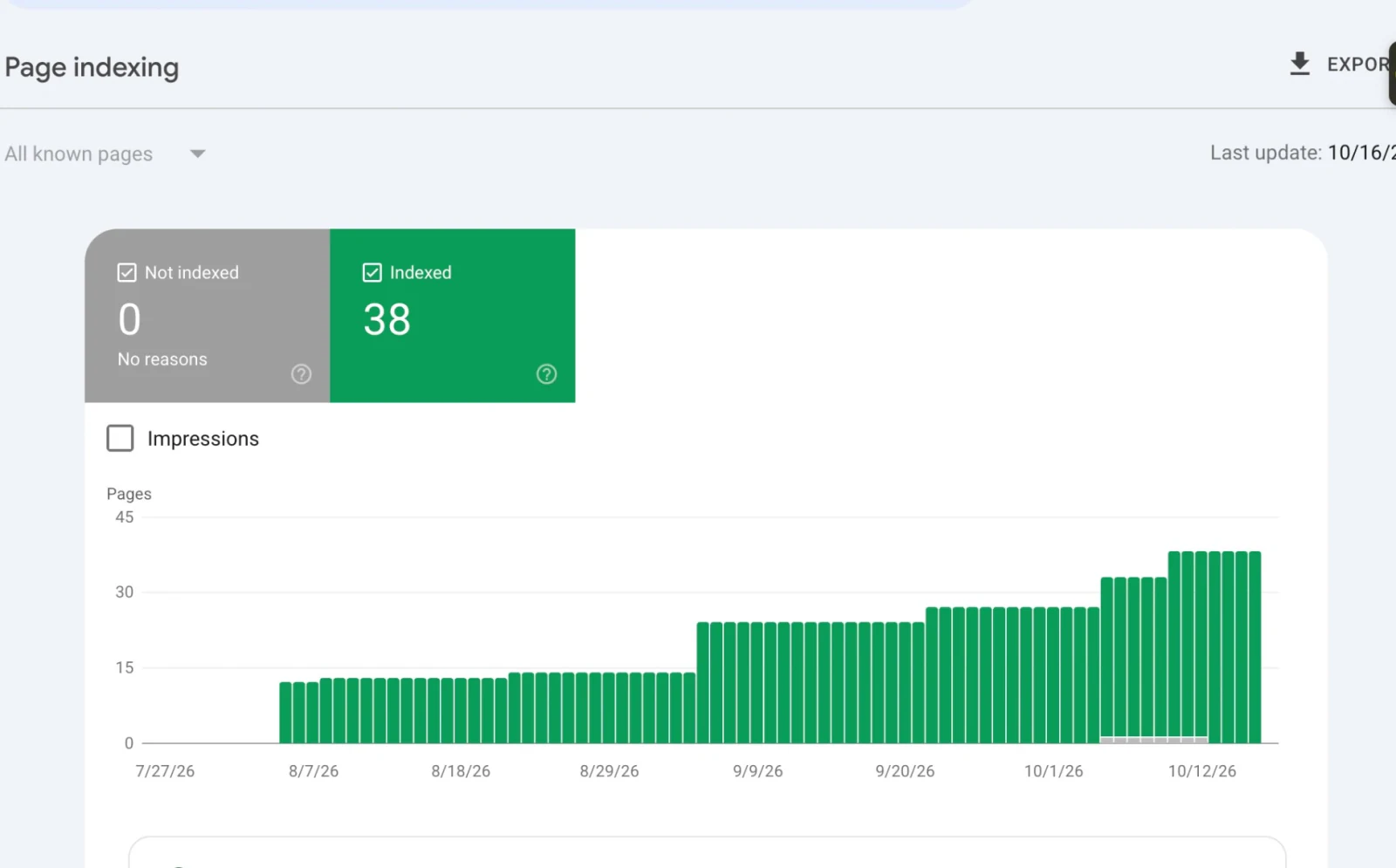
Google Search Console Page indexing, pktransporters.com, updated 16 October 2026: 38 pages indexed, 0 not indexed.
If pages show as excluded, the reason tells you what to do. "Crawled, currently not indexed" usually means the page is too thin or too similar to another; "Discovered, currently not indexed" usually means Google has not got round to it, and internal links help; "Excluded by noindex" means a tag is still blocking it. Google says there is no need to keep resubmitting pages; fix the cause and wait. Our guide to what a technical SEO audit includes explains which warnings matter.
In these weeks, expect impressions on your own name and on long-tail searches first. That is Google testing where your pages fit.
Months 1 to 3: Content, Authority and the First Clicks
Content that answers buying questions
Publish pages that answer what buyers ask before they call: what it costs, how long it takes, what is included, how you compare with the alternatives. These are the pages that turn impressions into enquiries. Naffees & Sons' cost guides by plot size are the clearest example in our work.
Links, if the domain is new
A brand-new domain has no authority. The Hungry Pelican, a small cafe in Queensland, shows what that looks like and how quickly it can change.
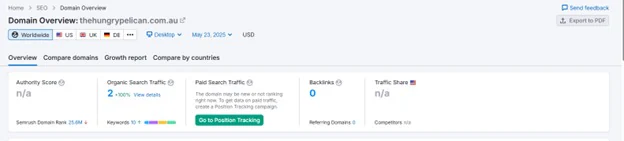
Starting point: Semrush, thehungrypelican.com.au, 23 May 2025. No Authority Score, 10 keywords, 0 backlinks.
Over the next eleven weeks, local link building earned 17 backlinks from 12 referring domains, and the site went from 10 to 95 ranking keywords. Twelve relevant domains, not hundreds. The full story is in the Hungry Pelican case study.
Not every new site needs this. Naffees & Sons and PK Transporters reached average positions of 5.7 and 5.8 with no link building, because they launched with many pages matched to specific local searches in markets where few competitors had done the same. Whether you need links depends on your competition, which is why it is worth checking before you pay for them.
The first clicks
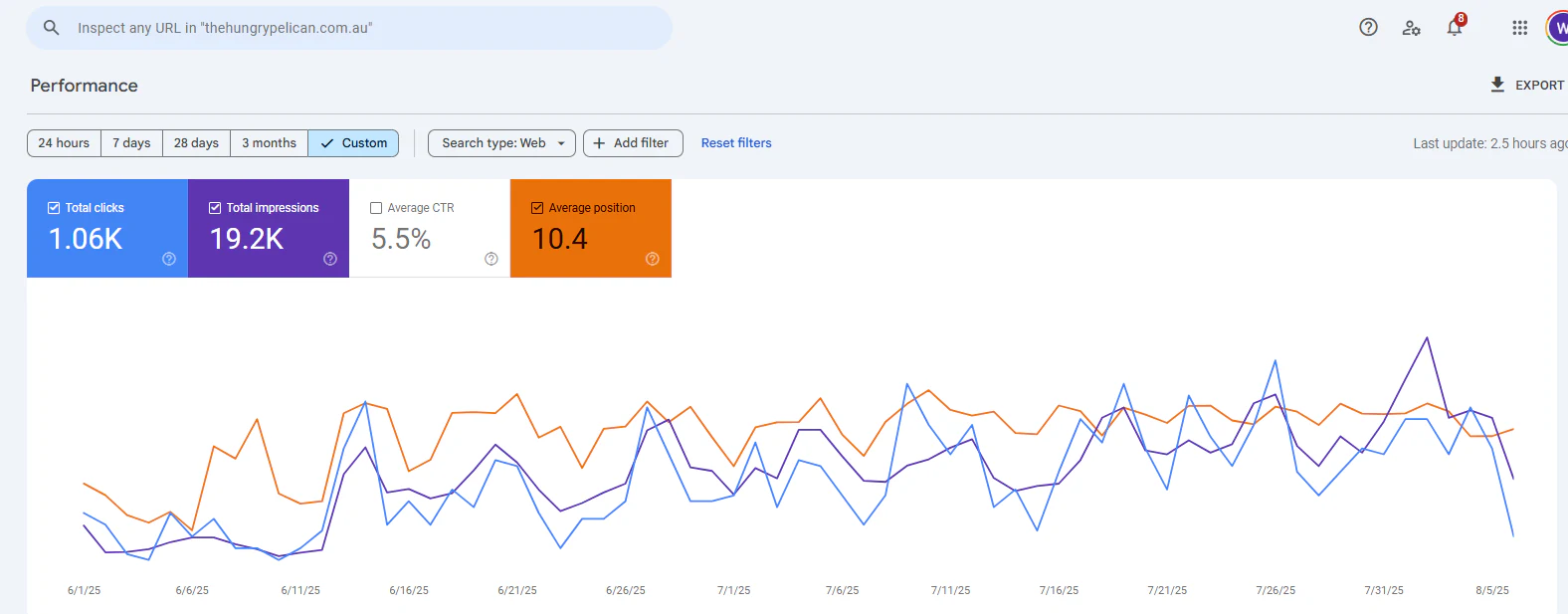
Google Search Console, thehungrypelican.com.au, 1 June to 5 August 2025: flat through early June, then rising. 1.06K clicks, 19.2K impressions.
This is what months one to three typically look like in Search Console: a flat start, then impressions and clicks lifting together. For Naffees & Sons, daily impressions rose from around 100 at the start of its three-month window to more than 700 by late October 2026.
The Mistakes That Most Often Hide a New Site
These are the problems that most often explain why a new site gets no search traffic months after launch. Each one is quick to check.
A leftover noindex. Staging sites are usually set to "noindex" so Google does not find them before launch. If the setting goes live with the site, Google is told not to index anything. Search Console's page indexing report will list the pages as "Excluded by noindex".
One page doing every job. A homepage that lists eight services in bullet points gives Google nothing specific to rank for any of them. Each service, and each place you serve, needs its own page with its own title.
Redirects forgotten in a rebuild. The old site's pages had rankings and links. Without one-step redirects to their new equivalents, that history is thrown away on launch day.
Text crawlers cannot see. Sites that build their text in the browser with JavaScript can look complete to a visitor and nearly empty to a crawler. "View page source" is the quick test.
No Search Console. Without it, nobody can see what Google thinks of the site, and problems go unnoticed for months.
A beautiful site with no way to enquire. Visitors arrive and leave. A form, a WhatsApp button or a booking link, matched to how your customers prefer to get in touch, is part of launch, not a later extra.
The Competitor Pulse Check
| Factor | ValueStreamAI approach | Design-only web agency | DIY launch |
|---|---|---|---|
| Keyword research before design | Yes, it decides the pages | Rarely | Rarely |
| Page per service and location | Built in | One "Services" page | One "Services" page |
| Search Console and sitemap on day one | Yes | Sometimes | Often forgotten |
| Redirects from the old site | Mapped URL by URL | Often skipped | Often skipped |
| First 90 days after launch | Monitored and marketed | Handover, then gone | Up to you |
Human Hours vs Automation: Mapping Redirects in a Rebuild
When a new website replaces an old one, someone has to map every old URL to its new home. Here is that job priced.
Assumptions: about 5 minutes per old URL by hand to find it, decide the closest new page and record the redirect. Light, typical and heavy sites of 100, 500 and 2,000 old URLs. Hourly rate: the US median for secretaries and administrative assistants, about $22.82 an hour (BLS, May 2024), base pay only. With a crawl and automated matching suggesting the closest page, we assume about 20% of the time remains for a person to check and correct the suggestions.
| Volume | Hours by hand | Cost by hand | Human time, assisted | Cost, assisted |
|---|---|---|---|---|
| 100 old URLs | ~8 | ~$190 | ~2 hours | ~$40 |
| 500 old URLs | ~42 | ~$950 | ~8 hours | ~$190 |
| 2,000 old URLs | ~167 | ~$3,800 | ~33 hours | ~$760 |
The other side of the ledger: the crawl and matching are part of a rebuild, not a separate product. What it leaves out: the cost of skipping it, which is far larger. A rebuild that drops redirects can lose rankings the old site took years to earn. For a large store, see our DSL Warehouse case study, where redirect problems were one of three issues fixed across more than 100 pages. Run your own figures in the hire vs automate calculator.
Frequently Asked Questions
How do I get my new website on Google?
Verify the site in Google Search Console, submit an XML sitemap, and check that no "noindex" tag or robots.txt rule blocks the pages. Pages are often indexed within days. Ranking for searches that matter takes longer: Google's own guidance is four months to a year.
How long does it take for a new website to rank?
Usually four months to a year. In our client data, two new sites we built reached average positions under 6 within a three-month window, and a new cafe domain went from 10 to 95 ranking keywords in eleven weeks. Competitive national terms take longer.
Does a new website need backlinks?
Often, but not always. A brand-new domain in a competitive market usually needs some relevant links before Google trusts it. Two sites we built reached average positions under 6 with no link building, because they launched with many pages matched to specific local searches.
What should I do before launching a new website?
Do keyword research, build a page for each service and location with its own title and description, add structured data, make sure the pages can be read by crawlers, and map redirects from any old site. Most of a new site's SEO is decided before launch.
Why are my new website's pages not indexed?
Check the page indexing report in Search Console for the reason. Common ones are a leftover noindex tag, a robots.txt block, pages too thin or too similar to others, or pages Google has found but not crawled yet. Fix the cause and wait; repeated resubmission does not help.
Will rebuilding my website hurt my SEO?
It can, if old URLs are not redirected to their new equivalents. Redirect each old URL in one step to its closest new page, keep content that was ranking, and submit the new sitemap. Done properly, a rebuild usually improves rankings.
What's Next
If you are about to launch or rebuild a website, the cheapest time to get the SEO right is before launch. We will review your plan, or your new site, on a free call.
→ See our SEO and digital marketing services
→ How long does SEO take? Real data
→ Read the full guide: build it and market it
→ See what building and marketing costs, or talk to us about your site
Syed Rayyan is co-founder of ValueStreamAI, leading research and marketing. He has run SEO for client websites since 2020, across technical audits, on-page work and link building, and leads the marketing side of every build. He also runs the firm's evaluation of emerging AI tooling and translates technical capability into clear guidance for non-technical decision-makers. Connect on LinkedIn →